{
"cells": [
{
"cell_type": "markdown",
"id": "7e18bd76-a0b5-40db-bfe9-252e676e51bb",
"metadata": {},
"source": [
"## Introduction to Data Science\n",
"\n",
"#### University of Redlands - DATA 101\n",
"#### Prof: Joanna Bieri [joanna_bieri@redlands.edu](mailto:joanna_bieri@redlands.edu)\n",
"#### [Class Website: data101.joannabieri.com](https://data101.joannabieri.com)\n",
"\n",
"---------------------------------------\n",
"# Homework Day 9\n",
"---------------------------------------\n",
"\n",
"GOALS:\n",
"\n",
"1. Import a messy DataFrame and fix it\n",
"2. Try a pivot\n",
"3. Play around with more advanced graphing and plotting\n",
"\n",
"----------------------------------------------------------\n",
"\n",
"This homework has **5 questions** and **2 exercises**.\n",
"\n",
"NOTE: Be kind to yourself. Working with data can be hard! Every data set is different. **Seriously** come get help! Come to office hours!"
]
},
{
"cell_type": "markdown",
"id": "d0c422e3-32b1-452f-89a8-2586784d3957",
"metadata": {},
"source": [
"## Important Information\n",
"\n",
"- Email: [joanna_bieri@redlands.edu](mailto:joanna_bieri@redlands.edu)\n",
"- Office Hours: Duke 209 Click Here for Joanna's Schedule\n",
"\n",
"\n",
"## Announcements\n",
"\n",
"**Review Day is Thursday 10/1. Bring your work on the Practice Exam from Day 7. Exam 1 is handed out that day.**\n",
"\n",
"**Data Ethics starts Thursday 10/22 (Day 13).** Start looking for resources - see the Day 9 announcements on the class website.\n",
"\n",
"## Day 9 Assignment\n",
"\n",
"1. Download Day9-HW.ipynb from the class website and move it into your `Day9` folder in your repo.\n",
"2. Open the file Day9-HW.ipynb and start doing the problems.\n",
" * You can do these problems as you follow along with the lecture notes and video.\n",
"3. Get as far as you can before class.\n",
"4. Submit what you have so far **Commit** and **Push** to Git.\n",
"5. Take the daily check in quiz on **Canvas**.\n",
"6. Come to class with lots of questions!"
]
},
{
"cell_type": "code",
"execution_count": null,
"id": "d0153569-41e3-4696-9b34-83ba90a0b5cf",
"metadata": {},
"outputs": [],
"source": [
"import numpy as np\n",
"import pandas as pd\n",
"\n",
"import matplotlib.pyplot as plt\n",
"import plotly.express as px\n",
"from plotly.subplots import make_subplots\n",
"import plotly.io as pio\n",
"pio.renderers.default = 'notebook_connected'"
]
},
{
"cell_type": "markdown",
"id": "21c16f48-0001-406e-acbf-d3e3ee536be2",
"metadata": {},
"source": [
"## Data Science Visualization - from start to finish\n",
"\n",
"Today we will do a full analysis where we will import data, do some data cleaning (recoding), and then walk through how to create a really beautiful visualization. \n",
"\n",
"Survey of religious traditions and income.\n",
"\n",
"Source: [pewforum.org/religious-landscape-study/income-distribution](https://www.pewforum.org/religious-landscape-study/income-distribution/), Retrieved 14 April, 2020\n",
"\n",
"This data is saved in a .xlsx file on the class website, so we can read it straight from its web address.\n",
"\n",
"`pd.read_excel()` needs the openpyxl package. You already installed it with `pip install -r requirements.txt` during Day 1 setup, so there is nothing to do here."
]
},
{
"cell_type": "code",
"execution_count": null,
"id": "e818c708-fe07-455e-b194-2b060962d799",
"metadata": {},
"outputs": [],
"source": [
"file_name = 'https://joannabieri.com/introdatascience/data/relig-income.xlsx'\n",
"DF = pd.read_excel(file_name)"
]
},
{
"cell_type": "code",
"execution_count": null,
"id": "b78325a5-6430-43ca-992d-6f2c8eb608e7",
"metadata": {},
"outputs": [],
"source": [
"display(DF)"
]
},
{
"cell_type": "markdown",
"id": "e52bac02-9991-4218-9142-5aa75c7b33fd",
"metadata": {},
"source": [
"**Q1** Describe the data you see here. How many variables and observations. What are the data types? What are the units?"
]
},
{
"cell_type": "markdown",
"id": "ab893dad-26b4-4dae-bb3c-d4dafeead8e3",
"metadata": {},
"source": [
"**(Your answer here)**"
]
},
{
"cell_type": "markdown",
"id": "fd16d63e-87ab-4ac3-98d4-95543d5cd66f",
"metadata": {},
"source": [
"**Q2** Following along with the lecture, say in words what each section of the code below does:\n",
"\n",
"**(Click here to answer each one)**\n",
"\n",
"* Section 1 -\n",
"* Section 2 -\n",
"* Section 3 -\n",
"* Section 4 -\n",
"* Section 5 -\n",
"* Section 6 -\n",
"* Section 7 -\n",
"* Section 8 - "
]
},
{
"cell_type": "code",
"execution_count": null,
"id": "e0abf6ff-b2e9-4849-b3ec-158e722acb18",
"metadata": {},
"outputs": [],
"source": [
"# Section 1\n",
"DF.rename(columns={ 'Religious tradition':'religion' ,'Sample Size' : 'n' },inplace=True)\n",
"# Section 2\n",
"DF_new = pd.melt(DF, id_vars=['religion','n'], var_name='income', value_name='proportion').sort_values('religion')\n",
"# Section 3\n",
"DF_new['frequency']=np.round(DF_new['proportion']*DF_new['n'])\n",
"# Section 4\n",
"DF_new['income']=DF_new['income'].apply(lambda x: str(x).replace('$',''))\n",
"# Section 5\n",
"DF_new.reset_index(inplace=True)\n",
"\n",
"# Section 6\n",
"name_to_change = 'Unaffiliated (religious \"nones\")'\n",
"new_name = 'Unaffiliated'\n",
"DF_new['religion']=DF_new['religion'].replace(name_to_change,new_name)\n",
"\n",
"# Section 7\n",
"name_to_change = 'Historically Black Protestant'\n",
"new_name = 'Hist. Black Protestant'\n",
"DF_new['religion']=DF_new['religion'].replace(name_to_change,new_name)\n",
"\n",
"# Section 8\n",
"name_to_change = 'Evangelical Protestant'\n",
"new_name = 'Ev. Protestant'\n",
"DF_new['religion']=DF_new['religion'].replace(name_to_change,new_name)\n",
"\n",
"DF_new"
]
},
{
"cell_type": "markdown",
"id": "37857e8f-ab26-4b41-a936-2c8d170a1875",
"metadata": {},
"source": [
"## Make a Bar Plot\n"
]
},
{
"cell_type": "markdown",
"id": "1a1f4ae9-3ea9-4c08-bd15-0a24d9f674ef",
"metadata": {},
"source": [
"## There are SO MANY CUSTOMIZATION OPTIONS!\n",
"\n",
"You are not expected to have all of these options memorized. You should just know that these things are possible and then look up examples for how to do fancier things. I always start simple and then add on from there.\n",
"\n",
"## Final Plot"
]
},
{
"cell_type": "code",
"execution_count": null,
"id": "4feea833-9437-4295-baa6-ce4a6ccae5a1",
"metadata": {},
"outputs": [],
"source": [
"\n",
"fig = px.bar(DF_new,\n",
" y='religion',\n",
" x='proportion',\n",
" color='income',\n",
" color_discrete_sequence=px.colors.qualitative.Vivid,\n",
" category_orders={'income' : ['Less than 30,000', '30,000-49,999', '50,000-99,999', '100,000 or more']})\n",
"\n",
"fig.update_layout(template=\"plotly_white\",\n",
" title='Income Distribution by religious group
Data Source: Pew Research Center, Religious Landscape Study',\n",
" title_x=0.5,\n",
" yaxis={'categoryorder': 'category descending'},\n",
" xaxis_title=\"Proportion\",\n",
" yaxis_title=\"\",\n",
" legend_title='Income',\n",
" legend={'orientation':\"h\",'yanchor':\"bottom\",'y':-0.2, 'xanchor':\"right\",'x':1.05},\n",
" font={'family':\"Courier New, monospace\",'size':16,'color':\"Darkblue\"},\n",
" autosize=False,\n",
" width=1000,\n",
" height=800)\n",
"\n",
"fig.show()\n",
"\n"
]
},
{
"cell_type": "markdown",
"id": "59ea143e-4cb3-45c6-a7d7-db7623af1c0e",
"metadata": {},
"source": [
"## Exercise 1\n",
"\n",
"Make your own version of the plot above. Here are some changes you should try:\n",
"\n",
"* Change the font family - some common fonts to try:\n",
" \n",
" [\"Arial\",\n",
" \"Balto\",\n",
" \"Courier New\",\n",
" \"Droid Sans\",\n",
" \"Droid Serif\",\n",
" \"Droid Sans Mono\",\n",
" \"Gravitas One\",\n",
" \"Old Standard TT\",\n",
" \"Open Sans\",\n",
" \"Overpass\",\n",
" \"PT Sans Narrow\",\n",
" \"Raleway\",\n",
" \"Times New Roman\"]\n",
"\n",
"* Move the legend to somewhere else.\n",
"\n",
"* Change the template and the color.\n",
"\n",
"* Advanced - look up how you can change the pattern_shape or pattern_shape_sequence. "
]
},
{
"cell_type": "markdown",
"id": "9a340259-ea38-4364-ac54-7a55bbaf512f",
"metadata": {},
"source": [
"## Exercise 2\n",
"\n",
"In this exercise we are going to import some very messy data and see how we can Recode, Tidy, and Pivot the data!\n",
"\n",
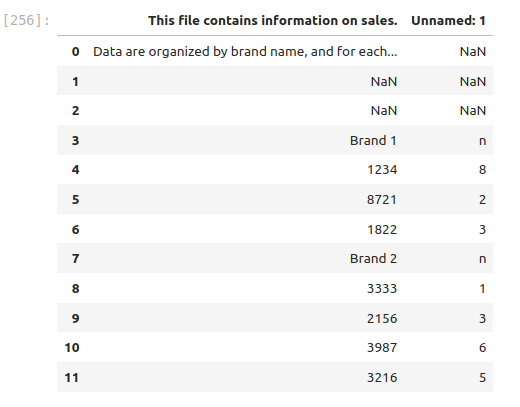
"### 1. Import the data from the file: file_name = 'https://joannabieri.com/introdatascience/data/sales.xlsx'\n",
"\n",
"Look at the DataFrame, the data is not in a great format. Why is this data not tidy? List a few reasons that this data has problems.\n"
]
},
{
"cell_type": "code",
"execution_count": null,
"id": "4ac5da4e-a24d-4676-ae31-5343a0c886a7",
"metadata": {},
"outputs": [],
"source": [
"# Your code here"
]
},
{
"cell_type": "markdown",
"id": "5c439b62-1852-42b5-8d99-d3469aad5303",
"metadata": {},
"source": [
"**(Click Here to answer questions)**"
]
},
{
"cell_type": "markdown",
"id": "6ee7c7dc-66a2-4cd0-b1f3-de813daeee22",
"metadata": {},
"source": [
"This is what you should see:\n",
"\n",
"\n",
"\n",
"\n",
"### 2. Now we need to fix this data - when we read this in there are some weird things happening.\n",
"\n",
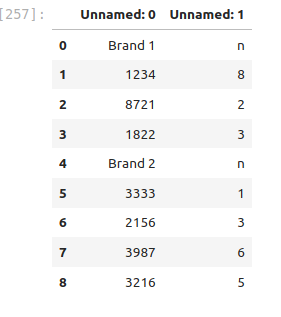
"Open the [sales.xlsx](https://joannabieri.com/introdatascience/data/sales.xlsx) file (it will download) and look in there. Notice that there are two weird rows at the top. \n",
"\n",
"How can we read the data in and skip some rows? Try running the command below to read the documentation. Are there any commands that might help us skip the first three rows when reading in the data?\n"
]
},
{
"cell_type": "code",
"execution_count": null,
"id": "0b2da725-4823-4e2e-8636-ab7427ca38c6",
"metadata": {},
"outputs": [],
"source": [
"pd.read_excel?"
]
},
{
"cell_type": "markdown",
"id": "1807b77b-2009-4f10-b05d-c20f17f13cf8",
"metadata": {},
"source": [
"Try writing your own code that will read in the data, skipping three rows, so that it looks like this:\n",
"\n",
"\n",
"\n"
]
},
{
"cell_type": "markdown",
"id": "9a3f0875-eca9-4627-a845-de7827d5503a",
"metadata": {},
"source": [
"### 3. This is better, but let's rename the columns\n",
"\n",
"In the lecture above we learned how to rename columns. Rename the columns in this DataFrame so that 'Unnamed: 0' becomes 'id' and 'Unnamed: 1' becomes 'n'. Your DataFrame should look like\n",
"\n",
"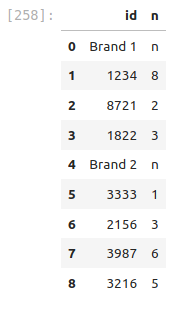\n",
"\n"
]
},
{
"cell_type": "markdown",
"id": "5e464859-768a-4407-9c97-16564643dd2a",
"metadata": {},
"source": [
"### 4. This is better, but....\n",
"\n",
"This is not yet a tidy data frame. Why not?\n"
]
},
{
"cell_type": "markdown",
"id": "61c0d665-e879-4cc0-a81e-c662b99f6388",
"metadata": {},
"source": [
"**(Your answer here)**"
]
},
{
"cell_type": "markdown",
"id": "4888a9a2-66aa-488f-a3fe-e4920dc5f22a",
"metadata": {},
"source": [
"\n",
"**How do we make it tidy?**\n",
"\n",
"We need to manipulate the data so that we have three columns. The brand, the id, and then the number of sales, but the brand information is mixed up in the id column. We are going to use the following command:\n",
"\n",
" brand_data = DF['id'].apply(lambda x: x if 'Brand' in str(x) else np.nan)\n",
"\n",
"Tell me what each part of this command does. For example break down each piece:\n",
"\n",
"a. DF['id']\n",
"\n",
"b. .apply()\n",
"\n",
"c. lambda x: x if 'Brand' in str(x) else np.nan\n",
"\n",
"HINT1 - here you see something new, an if else statement. \n",
"\n",
"- The command **'Brand' in str(x)** will check to see if the word 'Brand' is in each row. This will return True or False.\n",
"- To test this try **DF['id'].apply(lambda x: 'Brand' in str(x))** in a separate cell.\n",
"- The **if** statement checks to see if **'Brand' in str(x)** is True. If it is true it returns the x (original data). Otherwise it returns **np.nan**\n",
"- **np.nan** is how we can get Not a Number."
]
},
{
"cell_type": "markdown",
"id": "b96df96c-966f-4690-9fde-072afac0c8b5",
"metadata": {},
"source": [
"**(Your explanation of the command here)**"
]
},
{
"cell_type": "code",
"execution_count": null,
"id": "c1749848-4ab7-4dbe-ab6c-39a820e28d42",
"metadata": {},
"outputs": [],
"source": [
"# Now just run the command\n",
"brand_data = DF['id'].apply(lambda x: x if 'Brand' in str(x) else np.nan)\n",
"brand_data"
]
},
{
"cell_type": "markdown",
"id": "d0e4832e-fa0a-4541-8bb6-548bc3a9eca4",
"metadata": {},
"source": [
"### 5. Create a new empty column to store our brand_data\n",
"\n",
"You should know how to add a new column to a data frame. Use the column name 'brand'.\n"
]
},
{
"cell_type": "code",
"execution_count": null,
"id": "c8c9d26d-4307-4234-919e-9f4f7cca402c",
"metadata": {},
"outputs": [],
"source": [
"# Your code here"
]
},
{
"cell_type": "markdown",
"id": "8733dad9-1a3c-4665-915d-f0318493ca94",
"metadata": {},
"source": [
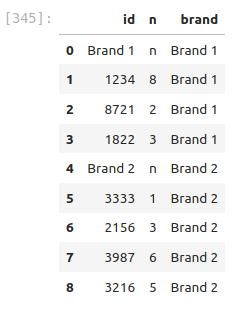
"### 6. Let's fill up those NaNs with the brand information\n",
"\n",
"The command **.ffill()** works like magic! It goes down the column and will fill any NaNs with the information from the cells above, until it gets to another good value. Check out what this command does!\n",
"\n",
"```{python}\n",
"DF=DF.ffill()\n",
"```\n",
"\n",
"Your data frame should look like\n",
"\n",
""
]
},
{
"cell_type": "code",
"execution_count": null,
"id": "5f6e53aa-f13a-4399-b678-5482ba12c3d8",
"metadata": {},
"outputs": [],
"source": [
"# Your code here (copy and paste)"
]
},
{
"cell_type": "markdown",
"id": "be66ba29-f820-4f74-a6c4-78f4cea683fc",
"metadata": {},
"source": [
"### 7. Finally mask out the rows that have bad 'id'\n",
"\n",
"Create a mask using \n",
"\n",
" mask = DF['id'].apply(lambda x:'Brand' not in str(x) )\n",
"\n",
"then apply that mask and save the result as `DF_new`. You should get\n",
"\n",
"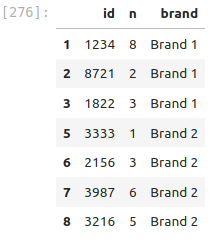"
]
},
{
"cell_type": "code",
"execution_count": null,
"id": "73a7efcb-2076-42fd-9dc5-c2046ef3480e",
"metadata": {},
"outputs": [],
"source": [
"# Your code here"
]
},
{
"cell_type": "markdown",
"id": "b8c05142-566f-43a2-ba14-d663f9964dff",
"metadata": {},
"source": [
"### 8. Now let's pivot!!\n",
"\n",
"Try out the **.pivot()** command. See if you can create a DataFrame that looks like this:\n",
"\n",
"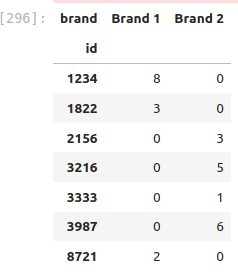\n",
"\n",
" DF_new.pivot(index=???, columns=???,values=???)\n",
"\n",
"\n",
"This is hard! The lecture notes have hints and answers!"
]
},
{
"cell_type": "code",
"execution_count": null,
"id": "7f853695-1b82-4834-8ad6-40d7455d73d8",
"metadata": {},
"outputs": [],
"source": [
"# Your code here"
]
},
{
"cell_type": "code",
"execution_count": null,
"id": "3e6eb62d-6d45-4d18-860d-93fb3170eafc",
"metadata": {},
"outputs": [],
"source": []
},
{
"cell_type": "code",
"execution_count": null,
"id": "dac822d2-79f5-495e-889b-1f444f61fc7f",
"metadata": {},
"outputs": [],
"source": []
}
],
"metadata": {
"kernelspec": {
"display_name": "Python 3 (ipykernel)",
"language": "python",
"name": "python3"
},
"language_info": {
"codemirror_mode": {
"name": "ipython",
"version": 3
},
"file_extension": ".py",
"mimetype": "text/x-python",
"name": "python",
"nbconvert_exporter": "python",
"pygments_lexer": "ipython3",
"version": "3.13.5"
}
},
"nbformat": 4,
"nbformat_minor": 5
}