import numpy as np
import pandas as pd

import matplotlib.pyplot as plt
import plotly.express as px
from plotly.subplots import make_subplots
import plotly.io as pio
pio.renderers.default = 'notebook_connected'Introduction to Data Science
Data Wrangling Continued - Multiple Data Frames
Important Information
- Email: joanna_bieri@redlands.edu
- Office Hours: Duke 209 Click Here for Joanna’s Schedule
Announcements
Exam 1 is handed out on Thursday 10/1. The Practice Exam is posted today so you can see what it will feel like!
Please come to office hours to get help!
Day 7 Assignment
- Download Day7-HW.ipynb from the class website and move it into your
Day7folder in your repo. - Open the file Day7-HW.ipynb and start doing the problems.
- You can do these problems as you follow along with the lecture notes and video.
- Get as far as you can before class.
- Submit what you have so far Commit and Push to Git.
- Take the daily check in quiz on Canvas.
- Come to class with lots of questions!
Join or Merge
Often we have data that comes to us from multiple different sources (multiple Data Frames) and we have to bring them together. This is called joining or merging!
First lets get some example data that we can use to demonstrate the different ways that we might join or merge our data.
DF_fake1 = pd.DataFrame({'id':[1,2,3],'data1':['x1','x2','x3']})
DF_fake1| id | data1 | |
|---|---|---|
| 0 | 1 | x1 |
| 1 | 2 | x2 |
| 2 | 3 | x3 |
DF_fake2 = pd.DataFrame({'id':[1,2,4],'data1':['y1','y2','y4']})
DF_fake2| id | data1 | |
|---|---|---|
| 0 | 1 | y1 |
| 1 | 2 | y2 |
| 2 | 4 | y4 |
You should notice that the first bit of data has information for id 1,2,3 and the second has information for id 1,2,4. We can imagine that we have four different observations and want to combine the information into a single data frame.
Grammar of the Merge/Join
To create a join in pandas you can use the pd.merge() function. This takes in two different data frames and merges them together based on information in one of the columns. Here is the basic command.
pd.merge(data frame 1, data frame 2, on='column name' ,how=type of merge )data frame 1 and data frame 2 should be separate data, but they must share at least one column. In our example they both have the id column.
on = tells the command which column is the common column. What column to use to match up the observations.
how = tells us the type of merge. The options we will learn about are “left”, “right”, “outer”, and “inner”
Left Join - how=“left”
This type of join uses only the ids from the data frame on the left - the one that is listed first. Here is a great .gif of what happens (image thanks to Data Science in a Box).

The python code below combines the two fake data sets. You will notice that it uses the ids from DF_fake1, and drops id=4 from DF_fake2. Because DF_fake2 does not have id=3, Python inserts “NaN” as a place holder for where no data was provided.
# Left return only ids from the left data frame
pd.merge(DF_fake1, DF_fake2, on='id',how='left')| id | data1_x | data1_y | |
|---|---|---|---|
| 0 | 1 | x1 | y1 |
| 1 | 2 | x2 | y2 |
| 2 | 3 | x3 | NaN |
Right Join - how=“right”
This type of join uses only the ids from the data frame on the right - the one that is listed second. Here is a great .gif of what happens (image thanks to Data Science in a Box).
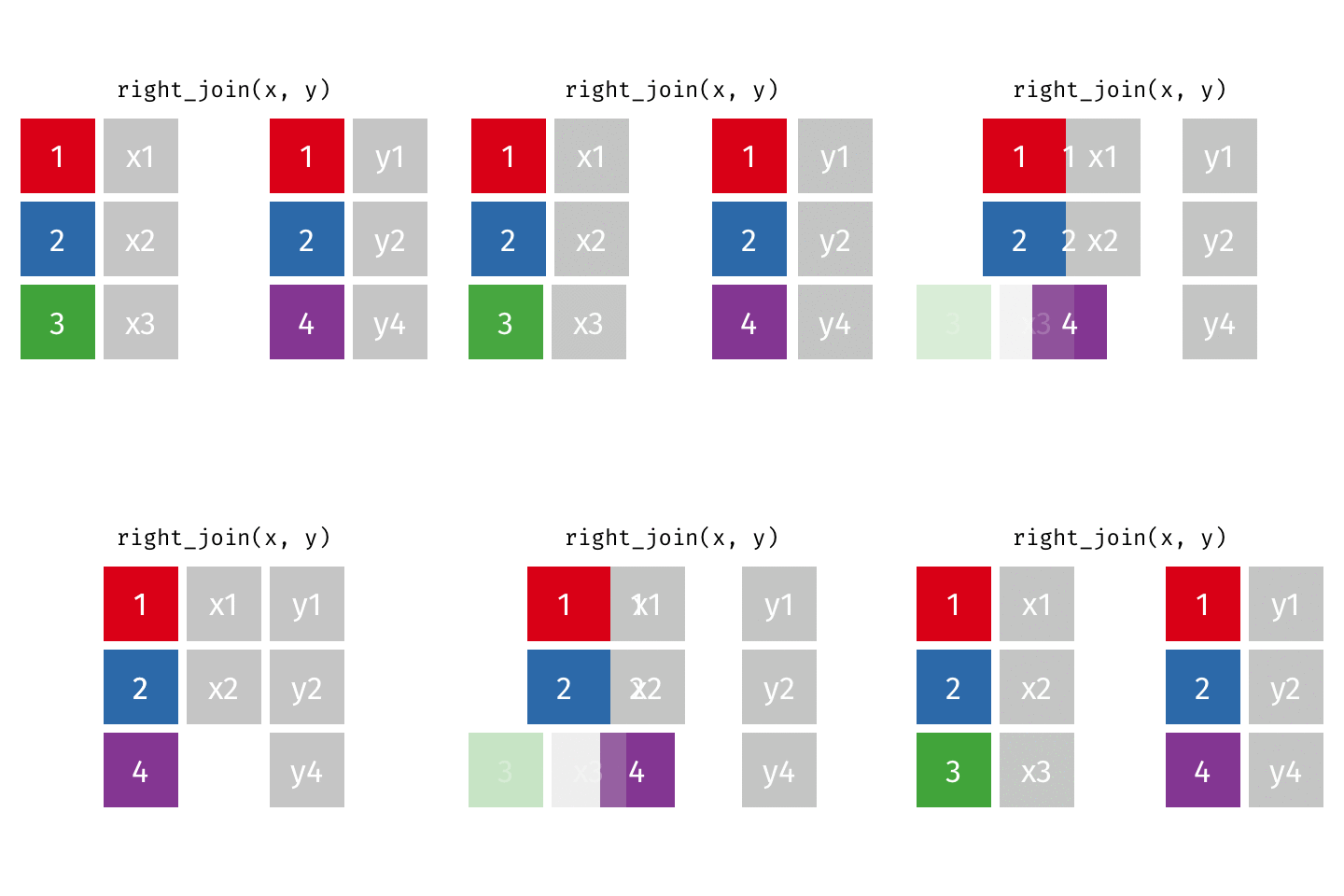
The python code below combines the two fake data sets. You will notice that it uses the ids from DF_fake2, and drops id=3 from DF_fake1. Because DF_fake1 does not have id=4, Python inserts “NaN” as a place holder for where no data was provided.
# Right return only ids from the right data frame
pd.merge(DF_fake1, DF_fake2, on='id',how='right')| id | data1_x | data1_y | |
|---|---|---|---|
| 0 | 1 | x1 | y1 |
| 1 | 2 | x2 | y2 |
| 2 | 4 | NaN | y4 |
Outer Join - how=“outer”
This type of join, also called a full join uses the ids from both DF_fake1 and DF_fake2. Here is a great .gif of what happens (image thanks to Data Science in a Box).
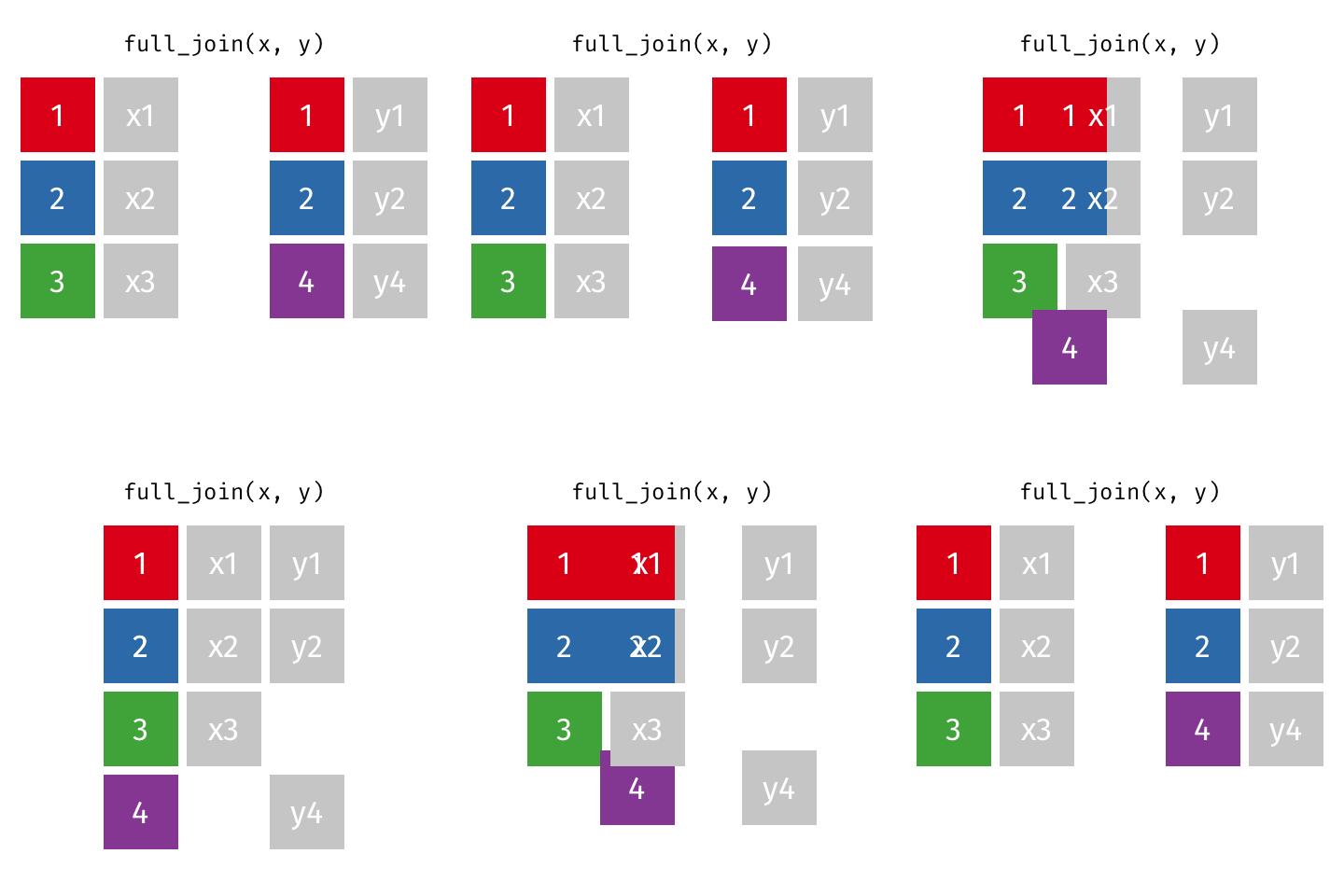
The python code below combines the two fake data sets. You will notice that it combines the ids from DF_fake1 and DF_fake2. Because DF_fake1 does not have id=4 and DF_fake2 does not have id=3, Python inserts “NaN” as a place holder for where no data was provided.
# Outer - Return all ids
pd.merge(DF_fake1, DF_fake2, on='id',how='outer')| id | data1_x | data1_y | |
|---|---|---|---|
| 0 | 1 | x1 | y1 |
| 1 | 2 | x2 | y2 |
| 2 | 3 | x3 | NaN |
| 3 | 4 | NaN | y4 |
Inner Join - how=“inner”
This type of join uses only the ids that appear in both DF_fake1 and DF_fake2. Here is a great .gif of what happens (image thanks to Data Science in a Box).
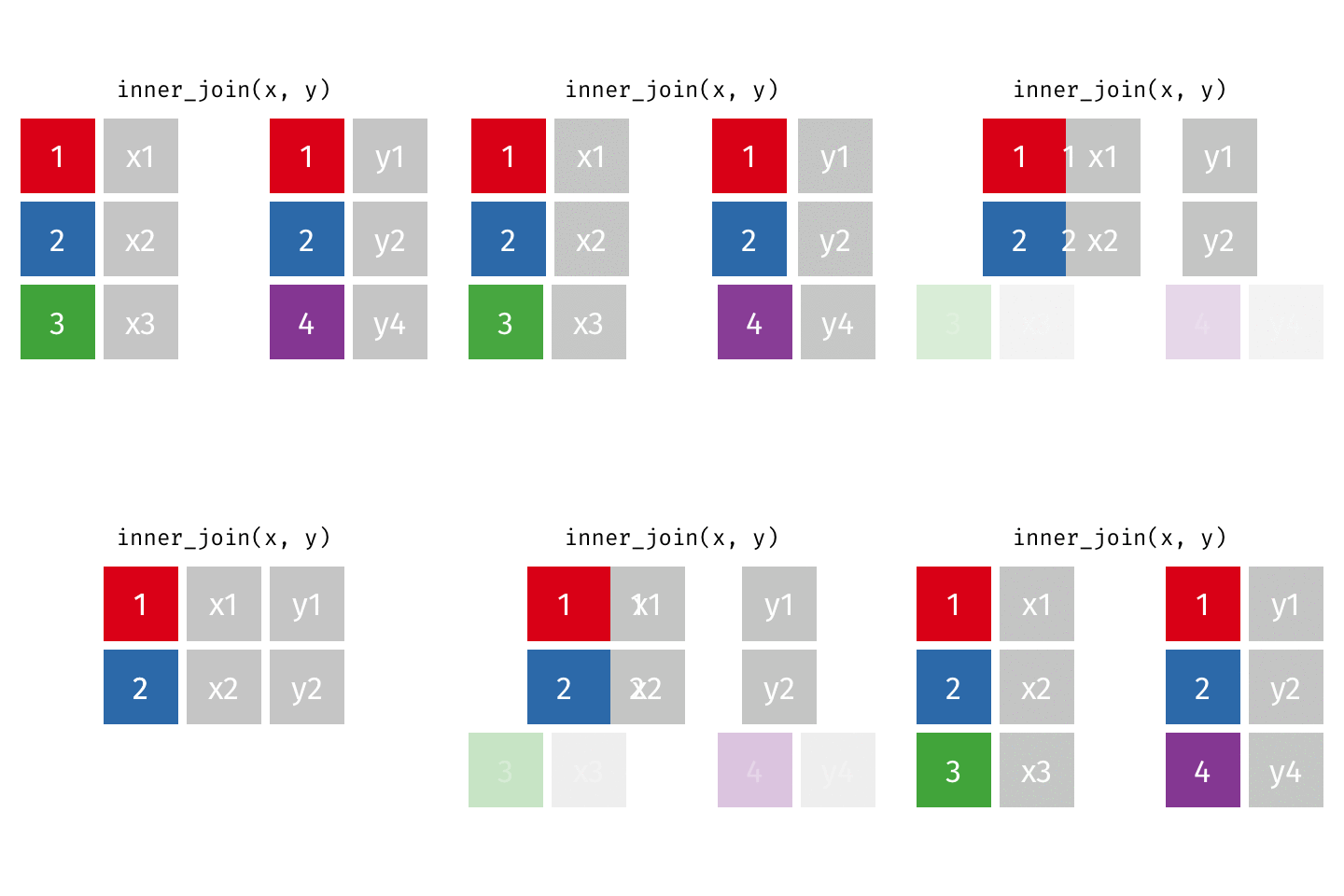
The python code below combines the two fake data sets. You will notice that it only keeps the ids that appear in both DF_fake1 and DF_fake2. Python does not insert a “NaN” since there was data in all the spots.
# Inner - Return only ids that both data frames have
pd.merge(DF_fake1, DF_fake2, on='id',how='inner')| id | data1_x | data1_y | |
|---|---|---|---|
| 0 | 1 | x1 | y1 |
| 1 | 2 | x2 | y2 |
Join and keep an indicator
Sometimes when you join you want to see where the data comes from. This can help you do an anti-join where you keep only ids that are NOT in both data frames. Here is an example:
# See where the data comes from by adding indicator=True
pd.merge(DF_fake1, DF_fake2, on='id',how='outer',indicator=True)| id | data1_x | data1_y | _merge | |
|---|---|---|---|---|
| 0 | 1 | x1 | y1 | both |
| 1 | 2 | x2 | y2 | both |
| 2 | 3 | x3 | NaN | left_only |
| 3 | 4 | NaN | y4 | right_only |
You notice that there is a new column “_merge” that tells us which data frame gave us the data. If we wanted to do an anti join, we could mask such that the data in merge is not equal to both.
Merging more realistic Data
Scientist data
Our data consists of information about women in science who changed the world:
Discover: Women in Science who Changed the World
This time we will load THREE different pieces of data
file1 = 'https://joannabieri.com/introdatascience/data/dates.csv'
DF_dates = pd.read_csv(file1)
file2 = 'https://joannabieri.com/introdatascience/data/professions.csv'
DF_professions = pd.read_csv(file2)file3 = 'https://joannabieri.com/introdatascience/data/works.csv'
DF_works = pd.read_csv(file3)Look at the data
display(DF_dates)
display(DF_professions)
display(DF_works)| name | birth_year | death_year | |
|---|---|---|---|
| 0 | Janaki Ammal | 1897 | 1984.0 |
| 1 | Chien-Shiung Wu | 1912 | 1997.0 |
| 2 | Katherine Johnson | 1918 | 2020.0 |
| 3 | Rosalind Franklin | 1920 | 1958.0 |
| 4 | Vera Rubin | 1928 | 2016.0 |
| 5 | Gladys West | 1930 | NaN |
| 6 | Flossie Wong-Staal | 1947 | NaN |
| 7 | Jennifer Doudna | 1964 | NaN |
| name | profession | |
|---|---|---|
| 0 | Ada Lovelace | Mathematician |
| 1 | Marie Curie | Physicist and Chemist |
| 2 | Janaki Ammal | Botanist |
| 3 | Chien-Shiung Wu | Physicist |
| 4 | Katherine Johnson | Mathematician |
| 5 | Rosalind Franklin | Chemist |
| 6 | Vera Rubin | Astronomer |
| 7 | Gladys West | Mathematician |
| 8 | Flossie Wong-Staal | Virologist and Molecular Biologist |
| 9 | Jennifer Doudna | Biochemist |
| name | known_for | |
|---|---|---|
| 0 | Ada Lovelace | first computer algorithm |
| 1 | Marie Curie | theory of radioactivity, discovery of element... |
| 2 | Janaki Ammal | hybrid species, biodiversity protection |
| 3 | Chien-Shiung Wu | confim and refine theory of radioactive beta d... |
| 4 | Katherine Johnson | calculations of orbital mechanics critical to ... |
| 5 | Vera Rubin | existence of dark matter |
| 6 | Gladys West | mathematical modeling of the shape of the Eart... |
| 7 | Flossie Wong-Staal | first scientist to clone HIV and create a map ... |
| 8 | Jennifer Doudna | one of the primary developers of CRISPR, a gro... |
Q Are each of these data sets Tidy?
Q Do they all contain the same number of observations?
Q What are the five variables?
Q What variable do they have in common - what can we join on
Combining Three Data Sets
You need to think about the order and whether or not you want to keep the maximum number of names or only keep names that are in all the data frames.
In this case we will try to keep the maximal amount of data - the maximum number of names.
- Combine the professions and works data
- Then add the dates data
# 1. Combine the professions and works data
DF_scientists = pd.merge(DF_professions,DF_works,on='name',how='left')
DF_scientists| name | profession | known_for | |
|---|---|---|---|
| 0 | Ada Lovelace | Mathematician | first computer algorithm |
| 1 | Marie Curie | Physicist and Chemist | theory of radioactivity, discovery of element... |
| 2 | Janaki Ammal | Botanist | hybrid species, biodiversity protection |
| 3 | Chien-Shiung Wu | Physicist | confim and refine theory of radioactive beta d... |
| 4 | Katherine Johnson | Mathematician | calculations of orbital mechanics critical to ... |
| 5 | Rosalind Franklin | Chemist | NaN |
| 6 | Vera Rubin | Astronomer | existence of dark matter |
| 7 | Gladys West | Mathematician | mathematical modeling of the shape of the Eart... |
| 8 | Flossie Wong-Staal | Virologist and Molecular Biologist | first scientist to clone HIV and create a map ... |
| 9 | Jennifer Doudna | Biochemist | one of the primary developers of CRISPR, a gro... |
Q What, if anything, would change if you switched to how=‘right’?
# 2. Then add the dates data
DF_scientists = pd.merge(DF_scientists,DF_dates,on='name',how='left')
DF_scientists| name | profession | known_for | birth_year | death_year | |
|---|---|---|---|---|---|
| 0 | Ada Lovelace | Mathematician | first computer algorithm | NaN | NaN |
| 1 | Marie Curie | Physicist and Chemist | theory of radioactivity, discovery of element... | NaN | NaN |
| 2 | Janaki Ammal | Botanist | hybrid species, biodiversity protection | 1897.0 | 1984.0 |
| 3 | Chien-Shiung Wu | Physicist | confim and refine theory of radioactive beta d... | 1912.0 | 1997.0 |
| 4 | Katherine Johnson | Mathematician | calculations of orbital mechanics critical to ... | 1918.0 | 2020.0 |
| 5 | Rosalind Franklin | Chemist | NaN | 1920.0 | 1958.0 |
| 6 | Vera Rubin | Astronomer | existence of dark matter | 1928.0 | 2016.0 |
| 7 | Gladys West | Mathematician | mathematical modeling of the shape of the Eart... | 1930.0 | NaN |
| 8 | Flossie Wong-Staal | Virologist and Molecular Biologist | first scientist to clone HIV and create a map ... | 1947.0 | NaN |
| 9 | Jennifer Doudna | Biochemist | one of the primary developers of CRISPR, a gro... | 1964.0 | NaN |
Q What, if anything, would change if you switched to how=‘right’?
Combining Two Data Sets - You Try
Q Write code that would combine the professions data and the dates data, but drop any names that don’t appear in both.
Hint
Join on the name but try an inner merge.
My Answer
DF_prof_date = pd.merge(DF_professions,DF_dates,on='name',how='inner')
DF_prof_date
Combining Three Data Sets - You Try
Q Try to combine the three data sets together (professions, works, and dates) but instead of doing what we did above, see if you can keep only the names that appeared in all three data sets.
Hint
Here is one way to order the operations. Try doing these one at a time to see what you get.
- merge professions and works on=‘name’ so that the data set with the least names sets the names.
- merge the data frame you created in 1 with dates on=‘name’ so that the data set with the least names sets the names. This time let indicator=True.
- create a mask so that you only keep rows where _merge is set to ‘both’
My Answer
DF_scientists = pd.merge(DF_professions,DF_works,on='name',how='right')
DF_scientists = pd.merge(DF_scientists,DF_dates,on='name',how='right',indicator=True)
mask = DF_scientists['_merge']=='both'
DF_scientists=DF_scientists[mask]
DF_scientists
Case study - Grocery Sales
Below you will load some data about grocery sales and see how joining or merging data can help us answer questions.
file1 = 'https://joannabieri.com/introdatascience/data/purchases.csv'
DF_purchases = pd.read_csv(file1)display(DF_purchases)| customer_id | item | |
|---|---|---|
| 0 | 1 | bread |
| 1 | 1 | milk |
| 2 | 1 | banana |
| 3 | 2 | milk |
| 4 | 2 | toilet paper |
file2 = 'https://joannabieri.com/introdatascience/data/prices.csv'
DF_prices = pd.read_csv(file2)display(DF_prices)| item | price | |
|---|---|---|
| 0 | avocado | 0.50 |
| 1 | banana | 0.15 |
| 2 | bread | 1.00 |
| 3 | milk | 0.80 |
| 4 | toilet paper | 3.00 |
Calculate the total revenue
We will have to join the data frames so that we can see the price of what was sold. So first we look for a common column. In this case both data frames have item as a column.
Now, think about how to calculate revenue… we need to add up the total money we made, so we need to know the price of each thing sold.
PAUSE - see if you can write some of the code for this before looking at the cells below
####We start by merging the two data frames on the column item, and save that data in the variable DF_combined.
DF_combined = pd.merge(DF_prices,DF_purchases,on='item',how='right')
DF_combined| item | price | customer_id | |
|---|---|---|---|
| 0 | bread | 1.00 | 1 |
| 1 | milk | 0.80 | 1 |
| 2 | banana | 0.15 | 1 |
| 3 | milk | 0.80 | 2 |
| 4 | toilet paper | 3.00 | 2 |
Then we can add up the price to get the total revenue!
DF_combined['price'].sum()np.float64(5.75)Q Calculate the revenue per customer? Hint - group by the customer id and then apply the sum().
Practice Exam
The Practice Exam for Exam 1 is posted on the class website as its own notebook, Day7-PracticeExam.ipynb. It is not graded, but you should really give it a try! We will go over it together on Review Day (Thursday 10/1). Some things you will notice:
- I do not give code in the practice exam, but you can copy and paste the code from your other assignments or the lecture notes.
- The exam will be open notes, open book, open basic internet search - but you should not use AI to generate your answer. It is usually very easy to see when code has been generated by AI - it will have commands we have not learned or a style of programming that is clearly AI. YOU MUST UNDERSTAND ALL THE CODE YOU SUBMIT!
- The questions get progressively more involved. Just do one at a time.
- I expect you to explain your results. I should not have to interpret what your numbers or code outputs mean. Add Markdown cells to describe what YOU see in the results.