Blue Q boxes are questions for you to answer by hand, in a notebook, with a pen. Not because I am old fashioned. Writing something down by hand is slow, and slow is the point: it is very hard to write an explanation you do not actually understand. You are welcome to use AI in this class for the mechanics of code, but these boxes are the part where you do the thinking yourself. Bring your written notes to class, I will ask to see them.
Green You Try boxes are optional code for you to work through. Nothing is collected and nothing is graded. They are there because you will learn more from changing a number and rerunning than from watching me do it.
New starting today: every code cell begins with a tag that tells you what to do with it.
# RUN THIS. Setup, loading data, a plot. Copy it, run it, move on. You do not need to be able to write it from memory.
# LEARN TO WRITE THIS. The pattern of the day. The homework will ask you for it, and so will the exam. Type it out yourself at least once rather than pasting it.
# DEMO ONLY. Fake data or a contrived experiment that exists to show one idea. You would never write this for a real project and you do not need to be able to.
Short answers to the Q boxes are in drop down boxes at the very bottom. Write yours first.
Asking AI about this code
A few of you told me you end up pasting code you do not understand. That is fixable, and AI can actually help, but only if you ask it the right kind of question. “Fix my code” gets you working code and teaches you nothing. Here are three prompts that get you a teacher instead of a vending machine.
FIRST - Start by telling your AI who you are and what your goals are for it: “I am an undergraduate student in a machine learning class and I want to get a deep understanding of what my code does and how it fits into the professional machine learning world. You are here to help me understand and learn the material, not to just fix my code. Please avoid heavy jargon and explain things to me at the level of an undergraduate student in a data science program.”
THEN - Prompt it with your question. Here are some example questions
Paste the cell, then ask: “Explain what each line does and why it is there. Do not rewrite it or improve it.” The last sentence matters. Without it the AI will hand you a fancier version and you are back where you started.
Ask about the one flag you do not recognize: “What does average="macro" do in f1_score, and what happens if I leave it out? Show me on a tiny example with 5 rows.” Asking for a tiny example is the trick. A 5 row example you can check by hand is worth more than three paragraphs.
Test your own understanding: “I think this code does X. Am I right? If not, where does my understanding go wrong?” Say what you think first. If you make it guess what you know it will guess wrong.
FINALLY - Tell it how you want the output if you want something other than what is printed to the screen. “Please write your output in an .ipynb so that I can run it and understand what is going on.” - OR - “Write your results as a .pdf that I can save in my directory for future use.” A file the AI writes for you is a study aid. It is not your homework. What you turn in is code you typed and sentences you wrote, and if I can tell the difference, so can you.
In the homework I will try to tell you, problem by problem, what is fine to copy from these notes and what I want you to write yourself. If you write it yourself and it breaks, that is a great time for prompt number 3.
Reading: Geron, chapter 3, the section on Performance Measures. This covers the confusion matrix, precision, recall, the trade off between them, and the ROC curve. Geron uses the MNIST digit data. We use wine.
Day 4 ended with a model that answered “no condition” to every patient and scored 100 percent on a fold that had no sick patients in it. That is not a trick fold, it is how accuracy behaves whenever the thing you care about is rare. Today we replace accuracy with numbers that cannot be fooled that way, and we learn that a classifier does not really make yes or no decisions at all. It makes a probability, and you decide where the line goes.
We are using real data today, the red wine from Weekly Homework 2. Instead of predicting the quality score, we are going to ask a yes or no question: is this a good wine? I am calling a wine good if its quality is 7 or 8. Only 217 of the 1599 wines make that cut, about 13.6 percent, which is exactly the kind of imbalance that makes accuracy lie.
Setup and a Split
# RUN THIS. Imports and the wine data, same file as Weekly Homework 2.import numpy as npimport pandas as pdimport matplotlib.pyplot as pltwine = pd.read_csv("data/winequality-red.csv", sep=";") # sep=";" because this file uses semicolons, not commas# Adding a new column: 1 if the wine is good (quality 7 or 8), 0 if not# See if you can make sense of this commandwine["good"] = (wine["quality"] >=7).astype(int) # astype(int) turns True/False into 1/0print(wine["good"].value_counts())print("share of good wines:", round(wine["good"].mean(), 3))
good
0    1382
1     217
Name: count, dtype: int64
share of good wines: 0.136
wine.head(5)
fixed acidity
volatile acidity
citric acid
residual sugar
chlorides
free sulfur dioxide
total sulfur dioxide
density
pH
sulphates
alcohol
quality
good
0
7.4
0.70
0.00
1.9
0.076
11.0
34.0
0.9978
3.51
0.56
9.4
5
0
1
7.8
0.88
0.00
2.6
0.098
25.0
67.0
0.9968
3.20
0.68
9.8
5
0
2
7.8
0.76
0.04
2.3
0.092
15.0
54.0
0.9970
3.26
0.65
9.8
5
0
3
11.2
0.28
0.56
1.9
0.075
17.0
60.0
0.9980
3.16
0.58
9.8
6
0
4
7.4
0.70
0.00
1.9
0.076
11.0
34.0
0.9978
3.51
0.56
9.4
5
0
wine['good'].value_counts()
good
0    1382
1     217
Name: count, dtype: int64
The good column is our label. Everything else except quality is a feature. (We have to drop quality too, or the model will just read the answer off it since this is how we created the column good.) We see from value counts that the data is very imbalanced!
Now the split, and today we do it the way Day 4 said to, all the way. The test set gets split off first and put away. It does not get opened again until the very last section of these notes. Stratify, because with only 13.6 percent positives one unlucky split could hand the test set far fewer good wines than the training set had.
I am using Geron’s names for the pieces, because we are about to cut the training data one more time: X_train_full is everything that is not the test set.
# LEARN TO WRITE THIS. Features, label, stratified split.from sklearn.model_selection import train_test_split# Create your X and y data. X = features, y = labelsX = wine.drop(columns=["quality", "good"]) # every column except the score and the labely = wine["good"]# Split the TEST set off first. It gets put away until the very end.X_train_full, X_test, y_train_full, y_test = train_test_split( X, y, test_size=0.25, stratify=y, # keep the same share of good wines in both sets random_state=42) # so we all get the same split# Extra - print some things about the resulting data setsprint("training rows (full):", X_train_full.shape[0], " test rows:", X_test.shape[0])print("share of good wines in train:", round(y_train_full.mean(), 3))print("share of good wines in test: ", round(y_test.mean(), 3))
training rows (full): 1199    test rows: 400
share of good wines in train: 0.136
share of good wines in test:  0.135
Three sets, and the rule for today
Day 4 gave you the vocabulary. Today we live by it.
Training set (X_train): the model fits its weights to this.
Validation set (X_valid): where we make choices. Which threshold, which metric, which model. We are allowed to look at it as many times as we want, because we are choosing between options, not fitting weights.
Test set (X_test): opened once, at the very end, to find out how the finished model does on wine it has never seen. Then we report that number and we are done.
Everything in these notes from here until the section called “The Test Set, Once” happens on the validation set. The confusion matrix, precision and recall, picking a threshold, the ROC and precision/recall curves, all of it. Choosing a threshold by looking at the test set is tuning on the test set, and it is the exact thing Day 4 told you never to do.
So we cut the training data one more time. Same command, same stratify, and now we have three sets.
# LEARN TO WRITE THIS. Split a validation set off the training data.X_train, X_valid, y_train, y_valid = train_test_split( X_train_full, y_train_full, test_size=0.25, stratify=y_train_full, # keep the share of good wines the same in both pieces random_state=42)print("training rows: ", X_train.shape[0])print("validation rows:", X_valid.shape[0])print("test rows: ", X_test.shape[0], " (put away)")print()print("share of good wines in validation:", round(y_valid.mean(), 3))print("number of good wines in validation:", y_valid.sum())
training rows:   899
validation rows: 300
test rows:       400   (put away)

share of good wines in validation: 0.137
number of good wines in validation: 41
Q1. Write this one out by hand
The validation set has 300 wines and 41 of them are good.
a. A model that answers “not good” for every single wine. What accuracy does it get on the validation set? Work it out, then say in one sentence whether you would buy that model.
b. Before we fit anything: write down a number for how accurate you think logistic regression will be on the validation set. Commit to it.
Fit a Model and Look at the Accuracy
Logistic regression, from Day 4. Scale the features first, because logistic regression is a linear model and the wine features are on wildly different scales (density is about 1, total sulfur dioxide is in the dozens). Scaler fit on the training data only, then applied to the validation set. Notice that the test set does not appear anywhere in this cell.
# LEARN TO WRITE THIS. '''Scale --> Fit (train the model) --> Predict (use the trained model) and Validate (retrain or update the model) --> Score (test the model).'''from sklearn.preprocessing import StandardScalerfrom sklearn.linear_model import LogisticRegressionfrom sklearn.metrics import accuracy_score#SCALEscaler = StandardScaler()X_train_scaled = scaler.fit_transform(X_train) # fit_transform on train: learns the mean and std, then scalesX_valid_scaled = scaler.transform(X_valid) # transform only on validation: reuses the training mean and std#FITmodel = LogisticRegression(max_iter=5000) # max_iter: how many steps the solver may take before it gives upmodel.fit(X_train_scaled, y_train)#PREDICTy_pred = model.predict(X_valid_scaled) # a 0 or 1 for every validation wineprint("accuracy:", round(accuracy_score(y_valid, y_pred), 4))
accuracy: 0.8867
0.8867. Almost 89 percent. If I stopped here and put that in a report, it would sound great.
But you did Q1a. A model that says that no wine is good gets 259 correct out of 300, which is 0.863. Our real model is 2.3 points better than a model that does nothing. That is the whole reason today exists: accuracy on imbalanced data is mostly the base rate, and the base rate is not something your model did.
The Confusion Matrix
Accuracy is one number, and it throws away the thing we actually want to know: which wines did it get wrong? There are two ways to be wrong. You can call a good wine not good, or you can call a not good wine good. Those are different mistakes, and depending on who you are, one of them costs a lot more than the other.
The confusion matrix keeps all four counts.
# LEARN TO WRITE THIS. # Understand the confusion matrix, and know its four numbers by name and meaning.from sklearn.metrics import confusion_matrix# Send in the real and the predicted data# This is the VALIDATION data. The test set is still put away.cm = confusion_matrix(y_valid, y_pred)print(cm)
[[252   7]
 [ 27  14]]
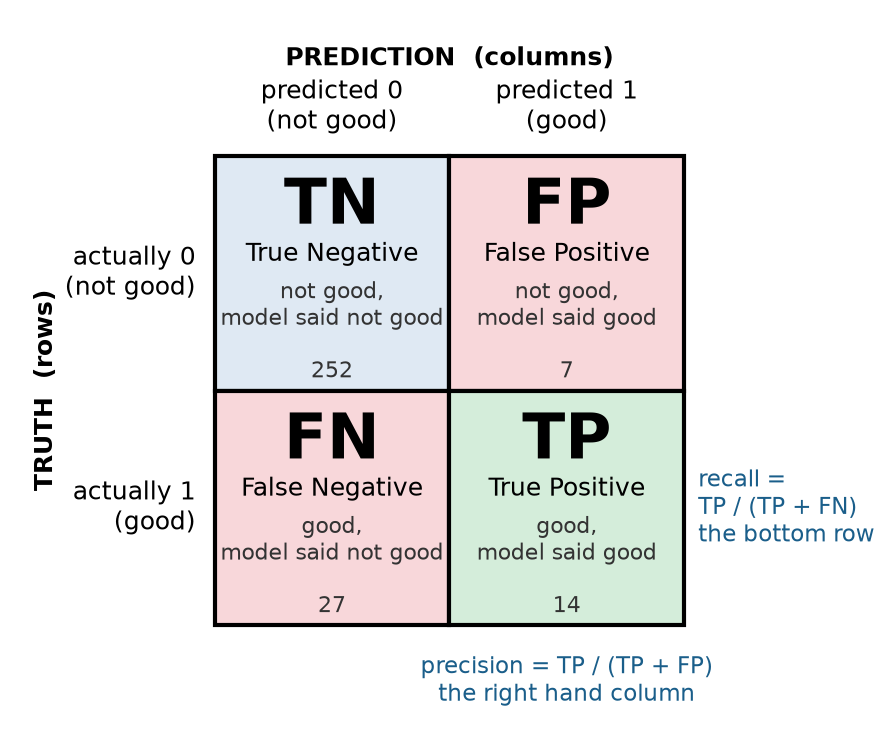
sklearn lays it out like this. Rows are the truth, columns are the prediction, and the 0 class comes first:
predicted 0 (not good)
predicted 1 (good)
actually 0
252
7
actually 1
27
14
Here is the same thing as a picture. Keep it next to you for the rest of today.
The four cells have names, and you need them because every number for the rest of today is built from them.
True negatives (TN), 252. Not good, and the model said not good. Boring, and most of the data.
False positives (FP), 7. Not good, but the model said good. A wine shop that trusted the model just bought 7 wines it should not have.
False negatives (FN), 27. Good, but the model said not good. 27 good wines the model never found.
True positives (TP), 14. Good, and the model said good.
Look at that bottom row. There are 41 good wines and the model found 14 of them. It missed almost twice as many as it caught. The 0.8867 accuracy hid that completely, because the 252 true negatives drown everything else out.
Here is how to pull the four numbers out of the matrix so you can use them:
# OPTIONAL. Unpack the four cells - makes reporting easiertn, fp, fn, tp = cm.ravel() # ravel() flattens the 2 by 2 into a list of 4, in the order TN, FP, FN, TPprint("true negatives: ", tn)print("false positives:", fp)print("false negatives:", fn)print("true positives: ", tp)
Here are 8 wines worth of fake data. The first row is the truth, the second row is what a model predicted.
truth:      1  0  1  0  1  0  0  0
predicted:  1  0  0  0  0  0  0  1
a. Fill in the 2 by 2 confusion matrix, in sklearn’s layout (rows are truth, columns are prediction, 0 first). Label each cell TN, FP, FN, or TP.
b. What is the accuracy?
c. How many of the good wines did the model find? How many of the wines it called good actually were?
Precision and Recall
Two numbers come straight out of the confusion matrix, and they answer the two questions above.
Precision answers: when the model says good, how often is it right?
\text{precision} = \frac{TP}{TP + FP}
Recall answers: of all the wines that really are good, how many did the model find?
\text{recall} = \frac{TP}{TP + FN}
Precision is about the column of positive predictions. Recall is about the row of actual positives. A model that never says yes has undefined precision (0 over 0) and a recall of exactly zero. That is the number that would have exposed the model for the fold with no observations on Day 4 instantly.
F1
There is also F1, which is a single number that combines the two. It is the harmonic mean, which is a kind of average that gets dragged toward whichever of the two is smaller:
F1 is useful when you need a single number to compare multiple models and you have no reason to care more about one kind of mistake (precision vs recall) than the other. Be careful with it, because that is rarer than people think.
# LEARN TO WRITE THIS. Precision, recall, and F1 from the predictions.from sklearn.metrics import precision_score, recall_score, f1_scoreprint("precision:", round(precision_score(y_valid, y_pred), 3))print("recall: ", round(recall_score(y_valid, y_pred), 3))print("f1: ", round(f1_score(y_valid, y_pred), 3))
precision: 0.667
recall:    0.341
f1:        0.452
Precision 0.667: when the model says a wine is good, it is right about two thirds of the time. Recall 0.341: it finds 34 percent of the good wines. Check them against the matrix: 14 / (14 + 7) and 14 / (14 + 27).
Same model, same predictions, and now instead of “almost 89 percent” the story is “it misses most of the good wine.” Both descriptions are true. One of them is useful.
Q3. Write this one out by hand
a. A wine shop uses the model to decide what to buy. Every wine the model calls good, they order a case of. Which number do they care about most, precision or recall? Explain in terms of what a mistake costs them.
b. A competition judge uses the model to make a shortlist, and will personally taste everything on it. Their fear is that a great wine never makes the list. Which number do they care about most?
c. Explain why a single F1 score would be a bad way to compare models for both of these people at once.
d. Pick a yes or no prediction problem from your own major or a job you want. Say what a false positive and a false negative each cost, which one is worse, and therefore whether you would tune for precision or recall.
The Threshold
Here is the part that changes how you think about classifiers. model.predict() did not decide anything. Logistic regression produces a probability for every wine (that is what the sigmoid from Day 4 was for), and predict just checks whether that probability is at least 0.5. The 0.5 is a default. Shouldn’t you have a say?!?
You can see the probabilities directly with predict_proba.
# LEARN TO WRITE THIS. # Find the probabilities behind the predictions.y_prob_both = model.predict_proba(X_valid_scaled) # two columns: P(not good), P(good), one row per wine - sum = 1# Show just the first five rows - since this is a lot of data# Round the numbers to three decimalsprint("first five rows, both columns:")print(np.round(y_prob_both[:5], 3))# Find the probability that the wine is goody_prob = y_prob_both[:, 1] # [:, 1] keeps every row, column 1 only: P(good)# Print out the resultsprint()print("P(good) for the first five wines:", np.round(y_prob[:5], 3))print("what predict() said: ", y_pred[:5])print("the truth: ", y_valid.values[:5])
first five rows, both columns:
[[0.868 0.132]
 [0.997 0.003]
 [0.925 0.075]
 [0.972 0.028]
 [0.791 0.209]]

P(good) for the first five wines: [0.132 0.003 0.075 0.028 0.209]
what predict() said:              [0 0 0 0 0]
the truth:                        [1 0 0 0 0]
The two columns add to 1 in every row, so we only ever need one of them. y_prob is the single most useful thing a classifier gives you, and from here on every curve and every score we build comes from it, not from y_pred.
Look at the first wine. It really is a good wine, and the model gave it 0.132, so predict said 0 and we lost it. Now look at the fifth: 0.209, also a no, but a much less confident no than wines two through four, which are all under 0.08. predict reports all five as the same 0. A yes or no throws away how confident the model was!
Now the part you control. Instead of the default 0.5, pick your own cutoff and build the predictions yourself.
# LEARN TO WRITE THIS. #Your own threshold.threshold =0.3# Use the y_prob = model.predict_proba(X_valid_scaled)[:,1] data from above# Then make your own cutoff!y_pred_30 = (y_prob >= threshold).astype(int) # True/False for every wine, turned into 1/0# Use your own cutoff in the confusion matrixprint(confusion_matrix(y_valid, y_pred_30))print("precision:", round(precision_score(y_valid, y_pred_30), 3))print("recall: ", round(recall_score(y_valid, y_pred_30), 3))
[[236  23]
 [ 16  25]]
precision: 0.521
recall:    0.61
At a threshold of 0.3, recall jumped from 0.341 to 0.610 and precision fell from 0.667 to 0.521. We now find 25 of the 41 good wines instead of 14, and we pay for it with 23 false positives instead of 7.
That is not a bug and it is not something to tune away. It is the precision/recall trade off and it is built into every classifier. Lowering the threshold means saying yes more often, so you catch more of the real positives (recall goes up) but more of your yeses are wrong (precision goes down). Raising it does the opposite.
Q4. Write this one out by hand
Before you run the next cell: we are going to move the threshold to 0.7.
a. Will precision go up or down compared to 0.5? Will recall? Commit to both.
b. At a threshold of 0.7, roughly how many wines do you think the model will call good? More than 21, or fewer? Why?
# LEARN TO WRITE THIS. # Use a for loop to change the threshold and watch the trade off.# Note this is just a copy of the process above, shoved into a for loop that changes tthresholds = [0.1, 0.2, 0.3, 0.4, 0.5, 0.6, 0.7]for t in thresholds: y_pred_t = (y_prob >= t).astype(int) p = precision_score(y_valid, y_pred_t) r = recall_score(y_valid, y_pred_t) n_yes = y_pred_t.sum()print("threshold", t, " called good:", n_yes, " precision:", round(p, 3), " recall:", round(r, 3))
threshold 0.1   called good: 100   precision: 0.32   recall: 0.78
threshold 0.2   called good: 71   precision: 0.408   recall: 0.707
threshold 0.3   called good: 48   precision: 0.521   recall: 0.61
threshold 0.4   called good: 30   precision: 0.5   recall: 0.366
threshold 0.5   called good: 21   precision: 0.667   recall: 0.341
threshold 0.6   called good: 9   precision: 0.667   recall: 0.146
threshold 0.7   called good: 5   precision: 0.6   recall: 0.073
At 0.7 the model calls only 5 wines good. It is right about 3 of them (precision 0.6) and it has found 3 of the 41 (recall 0.073). At 0.1 it calls 100 wines good, finds 32 of the 41 (recall 0.78), and more than two thirds of its yeses are wrong (precision 0.32).
Precision vs Recall - Which Is More Important?
Here is the question to ask about any classification problem, before you look at a single number: which mistake is worse, a false positive or a false negative? Almost every real problem has an answer, and the answer tells you which of precision and recall to put first.
You care more about recall when missing a real positive is the expensive mistake. In the case where a false negative is a disaster and a false positive is an inconvenience, you lower the threshold, which means you say yes more often, and you accept the false alarms.
Screening for a disease. A missed cancer is far worse than an unnecessary follow up scan.
Finding fraud. A missed fraudulent transaction is money gone. A flagged honest one is a phone call.
Recalling a defective product. Miss one and somebody gets hurt. Recall too many and you lose some money.
Search and rescue, security screening, finding every document that matters in a legal case. Same shape every time: the cost of missing one is enormous.
You care more about precision when a wrong yes is the expensive mistake. In the case where a false positive costs somebody something real, and a false negative is something you can live with, you raise the threshold, which means you only say yes when the model is very sure, and you accept that you will miss some.
A spam filter. One real email from your boss in the spam folder is worse than ten spam messages in your inbox.
Recommending something. Every bad recommendation makes people trust you less. Not recommending a good thing costs nothing anyone notices.
Flagging a student for cheating, or a customer for a crime. A wrong accusation lands on a real person.
Any system that acts automatically on a yes, like freezing a card or deleting a post. Every wrong yes is a wrong action.
Can we have the best of both? Yes if we use two steps! A lot of real systems use a high recall model first, to make sure nothing is missed, and then a human (or a second, pickier model) goes through the flagged pile to bring the precision back up. The screening test catches everything, the specialist decides. If you are ever asked “how do we get both,” this is usually the answer.
When you genuinely care about both, report both, and say what threshold you used.
The expensive mistake is…
You care most about
Threshold goes
Example
missing a real positive (FN)
recall
down
cancer screening, fraud, defect recall
a wrong yes (FP)
precision
up
spam filter, recommendations, accusations
both, about equally
precision and recall together, F1 to compare models
wherever the curve says
many balanced problems
The sentence that belongs in every report you write from now on is some version of: “We tuned for recall because a missed case costs far more than a false alarm.” If you cannot write that sentence for your problem, then you do not understand your problem yet.
Precision Recall Curve
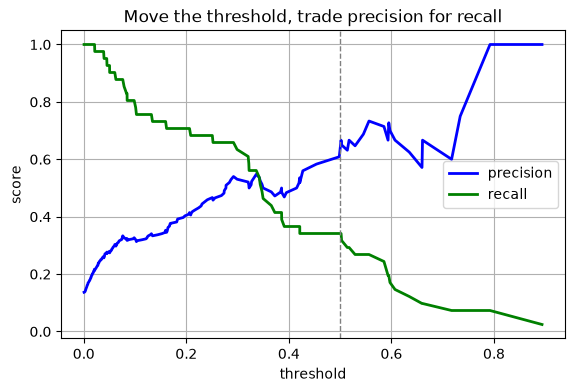
sklearn will compute this for every possible threshold at once with precision_recall_curve. It returns three arrays: the precision and recall at each cutoff, and the cutoffs themselves. Then you can graph the results and see how changing the threshold affects your model’s predictions.
# RUN THIS. Precision and recall as the threshold moves.# Good to know this can be done, not used often in practicefrom sklearn.metrics import precision_recall_curveprecisions, recalls, cutoffs = precision_recall_curve(y_valid, y_prob)# precisions and recalls have one more entry than cutoffs (a final point at recall 0), so drop the last one when plotting against cutoffsplt.figure(figsize=(6.5, 4))plt.plot(cutoffs, precisions[:-1], "b-", linewidth=2, label="precision")plt.plot(cutoffs, recalls[:-1], "g-", linewidth=2, label="recall")plt.axvline(0.5, color="gray", linestyle="--", linewidth=1)plt.xlabel("threshold")plt.ylabel("score")plt.title("Move the threshold, trade precision for recall")plt.grid()plt.legend()plt.savefig("images/01-threshold-tradeoff.png", dpi=150, bbox_inches="tight")plt.show()
The dashed line is the default 0.5 that predict() uses. Everything to the left of it is a choice you could have made and did not. If we go to the left, decrease the threshold, we gain recall but at the cost of decreasing precision. This is what we saw when we predicted more good wines but got more false positives. There is no threshold where both are high, and that is not the model’s fault, it is the data. Good and not good wines overlap in feature space, the cutoff is not clear, and no cutoff separates them cleanly.
Who picks the threshold? Not sklearn! You do, based on what the two mistakes cost. That is a judgment call, and it usually needs to involve whoever is going to use the model. Which do you care more about?
The ROC Curve
The precision/recall plot above is one way to look at every threshold at once. The ROC curve is another, and it is the one you will see most often in papers and in job interviews, so you need to be able to read it. It is most useful for comparing two different models.
ROC plots two rates against each other, one point per threshold:
True positive rate, which is just recall under another name: TP / (TP + FN). Of the real positives, what share did we catch?
False positive rate: FP / (FP + TN). Of the real negatives, what share did we wrongly call positive?
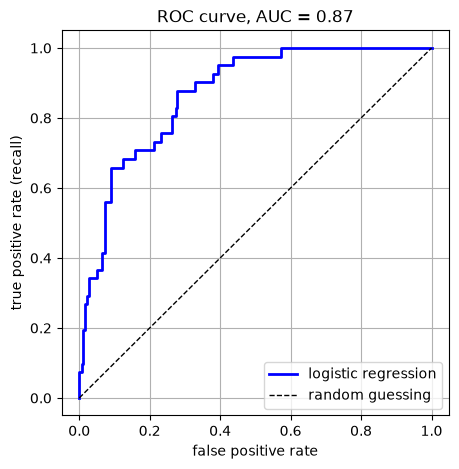
A perfect model goes straight up the left edge to the top left corner (catch everything, no false alarms). A model that guesses at random sits on the diagonal. The area under the curve, called AUC or ROC AUC, squashes the whole thing into one number: 1.0 is perfect, 0.5 is guessing.
# LEARN TO WRITE THIS. The ROC curve and its area.from sklearn.metrics import roc_curve, roc_auc_score# Use the roc_curve function - send in the real data and the predicted probabilitiesfpr, tpr, cutoffs = roc_curve(y_valid, y_prob) # false positive rate and true positive rate at every cutoffauc = roc_auc_score(y_valid, y_prob) # note: this takes y_prob, not y_pred# Make a plot of the fpr = false positive rate versus tpr = true positive rateplt.figure(figsize=(5, 5))plt.plot(fpr, tpr, "b-", linewidth=2, label="logistic regression")# Here we just add a dashed line to show what random guessing would giveplt.plot([0, 1], [0, 1], "k--", linewidth=1, label="random guessing")# Make it look niceplt.xlabel("false positive rate")plt.ylabel("true positive rate (recall)")plt.title("ROC curve, AUC = "+str(round(auc, 3)))plt.grid()plt.legend()# Save itplt.savefig("images/02-roc.png", dpi=150, bbox_inches="tight")plt.show()print("ROC AUC:", round(auc, 3))
ROC AUC: 0.87
AUC 0.870. That sounds excellent, and there is a nice plain English reading of it: if you pick one good wine and one not good wine at random, the model gives the good one the higher probability 87 percent of the time.
Notice one thing before you get too happy. The ROC curve and the AUC never looked at y_pred. They only used y_prob, so they do not depend on the threshold at all. You could totally still pick a bad threshold and have a bad model. BUT AUC is a score for the ranking the model produces, not for any particular yes or no decision. That makes it great for comparing models and useless for telling you what will happen at the threshold you actually deploy.
Q5. Write this one out by hand
a. Our model got 0.8867 accuracy and 0.870 AUC. Explain why those are not measuring the same thing, and why changing the threshold to 0.3 would change one of them and not the other.
b. A colleague says “my model has AUC 0.95 so it is 95 percent accurate.” What is wrong with that sentence?
The Precision/Recall Curve, and Why It Matters When Positives Are Rare
Now instead of plotting both Precision and Recall along the x-axis like we did above, we will look at plotting the recall vs the precision. Why?
Here is the catch with ROC. The false positive rate divides by the number of negatives, and in our validation set that is 259. Our default model made 7 false positives. As a false positive rate that is 7 / 259, about 2.7 percent, which looks tiny on the ROC plot. But those same 7 wrong yeses were 7 of the 21 wines the model called good, which is a third of its positive predictions. The wine shop notices the second number, they bought 21 wines and only 14 of them were good! They care much less about the false positive rate. What does this mean to you?
Your goal is to have a deep understanding of what each of these numbers can and cannot tell you about your model!
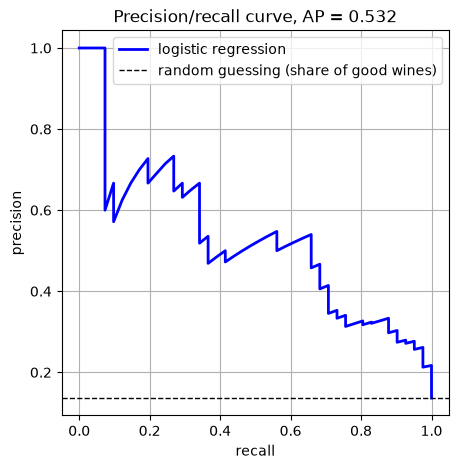
When positives are rare, the ROC curve flatters the model, because there are so many negatives that even a lot of false positives makes a small rate. The precision/recall curve does not have that problem, because precision divides by the number of positive predictions, not by the number of negatives.
The PR curve plots precision against recall, one point per threshold. Its one number summary is average precision (AP), which is roughly the area under it.
# LEARN TO WRITE THIS. The precision/recall curve and average precision.from sklearn.metrics import average_precision_score# Get the numbers - notice we send in the real data and the probabilitiesprecisions, recalls, cutoffs = precision_recall_curve(y_valid, y_prob)ap = average_precision_score(y_valid, y_prob) # again from y_prob, not y_pred# Plot the precision and recall curve.plt.figure(figsize=(5, 5))plt.plot(recalls, precisions, "b-", linewidth=2, label="logistic regression")plt.axhline(y_valid.mean(), color="k", linestyle="--", linewidth=1, label="random guessing (share of good wines)")plt.xlabel("recall")plt.ylabel("precision")plt.title("Precision/recall curve, AP = "+str(round(ap, 3)))plt.grid()plt.legend()plt.savefig("images/03-pr-curve.png", dpi=150, bbox_inches="tight")plt.show()# print the average precision scoreprint("average precision:", round(ap, 3))
average precision: 0.532
AP 0.532. Same model, same validation set, same probabilities as the 0.870 AUC that was reported above. Two honest summaries of the same thing, and one of them says “awesome” while the other says “so-so”.
The dashed line is what random guessing gets on a PR plot: precision equal to the share of positives, 0.137. Our curve sits well above it, so the model is doing something. But look at the shape. To get recall above 0.6 you have to accept precision of about 0.5, and there is nothing you can do about that by moving the threshold.
Which one do you report?
When positives are rare and you care about the positives, you should report PR and average precision.
When the classes are balanced or you genuinely care about both kinds of error equally, ROC AUC is fine and more people will recognize it.
If you are not sure, show both and say why they disagree. That sentence, on its own, will make you look like you know what you are doing.
Q6. Write this one out by hand
a. In your own words, why does the ROC curve make a model look better than the PR curve does when positives are rare? Point at which denominator is the problem.
b. Suppose I rebuilt the wine data so that half the wines were good. Would you expect the AUC and the AP to be closer together or farther apart than 0.870 and 0.532? Why?
Calibration: Does 0.7 Mean 70 Percent?
There is one more thing that y_prob gives us! It is often ignored.
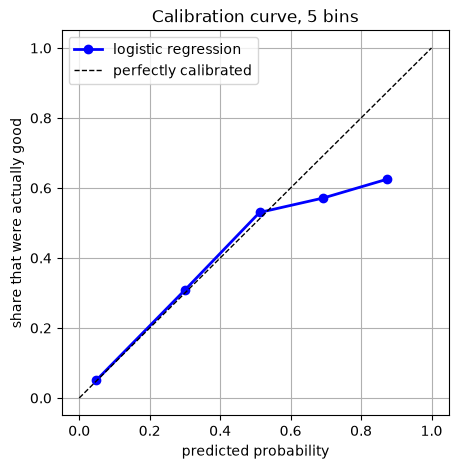
When the model says a wine has a 0.7 probability of being good, is that true? If you collected every wine the model gave about 0.7 to, would about 70 percent of them really be good? A model where that holds is called calibrated. A model can rank wines perfectly (AUC 1.0) and still be badly calibrated, for example by giving every good wine 0.6 and every bad wine 0.4. The ranking is perfect and the probabilities are nonsense. If we want to use y_prob as a probability that is meaningful we have to calibrate our model!
Calibration matters the moment somebody uses the probability as a probability. “There is a 70 percent chance this tumor is malignant” is a sentence a doctor acts on. If the model is not calibrated, that sentence is false.
To check calibration we need honest probabilities on data the model did not train on. The validation set is small (300 wines, and only 41 good ones), so instead we use a cross validation type process, cross_val_predict, on the full training set, all 1199 wines that are not the test set. It works like cross_val_score from Day 4, except that instead of returning a score per fold it returns a prediction for every row, each one made by a model that did not train on that row. NOTE: To avoid leakage we put everything in a pipeline.
# JUST RUN THIS. Honest probabilities for every training wine, then the calibration curve.from sklearn.model_selection import cross_val_predictfrom sklearn.pipeline import make_pipelinefrom sklearn.calibration import calibration_curvepipe = make_pipeline(StandardScaler(), LogisticRegression(max_iter=5000)) # scaler inside, so each fold scales on its own training party_prob_cv = cross_val_predict( pipe, X_train_full, y_train_full, cv=5, method="predict_proba")[:, 1] # method="predict_proba": give me probabilities, not 0/1 labels. [:, 1] keeps only P(good)# calibration_curve sorts the wines into bins by predicted probability, then in each bin# compares the average prediction to the share that were really goodtrue_share, predicted_avg = calibration_curve(y_train_full, y_prob_cv, n_bins=5)print("average predicted P(good) in each bin:", np.round(predicted_avg, 2))print("share that were actually good: ", np.round(true_share, 2))plt.figure(figsize=(5, 5))plt.plot(predicted_avg, true_share, "bo-", linewidth=2, label="logistic regression")plt.plot([0, 1], [0, 1], "k--", linewidth=1, label="perfectly calibrated")plt.xlabel("predicted probability")plt.ylabel("share that were actually good")plt.title("Calibration curve, 5 bins")plt.grid()plt.legend()plt.savefig("images/04-calibration.png", dpi=150, bbox_inches="tight")plt.show()
average predicted P(good) in each bin: [0.05 0.3  0.51 0.69 0.87]
share that were actually good:        [0.05 0.31 0.53 0.57 0.62]
Read it bin by bin. The wines the model put near 0.05 probability of being good were good 5 percent of the time, which is great. The bin near 0.30 was good 31 percent of the time. Also good. However, at the top, the model predicted 0.87 probability of the wine being good, but the real share of good wines in this bunch was 0.62. The model is overconfident about its favorite wines.
Before you panic about that last point, count. np.histogram will tell you how many wines landed in each bin.
# RUN THIS. How many training wines are in each calibration bin?counts, edges = np.histogram(y_prob_cv, bins=[0, 0.2, 0.4, 0.6, 0.8, 1.0])print("wines per bin:", counts)
wines per bin: [917 156 83 35 8]
917, 156, 83, 35, 8. The top bin has eight wines in it. A share computed from eight wines could be almost anything. So the honest reading is: the model is well calibrated where most of the data lives, and we do not have enough confident predictions to say much about the top end. That is a very normal result for logistic regression, which tends to be reasonably calibrated out of the box. Some other models are not (random forests and support vector machines are the usual suspects), and sklearn has CalibratedClassifierCV to fix them. We are not going there today, but now you know the word to look up.
Q7. Write this one out by hand
a. Describe a model that has AUC exactly 1.0 and is terribly calibrated. Be specific about what probabilities it gives.
b. Our model gave the 156 wines in the 0.2 to 0.4 bin an average probability of 0.30, and 31 percent of them were good. Say in one sentence what that means for someone who uses these probabilities.
c. Why did we use cross_val_predict instead of just calling predict_proba on the training data to get the probabilities for the calibration curve? What would have gone wrong?
The Test Set, Once
We made our choices on the validation set. Let us say the wine shop talked it over and decided a threshold of 0.3 is the trade they want: more good wines found, some more duds bought. That decision is made, so now, and only now, we open the test set.
We use the model we already have and the scaler we already have. The scaler learned its mean and standard deviation from the training data, so the test set only gets .transform(), never .fit_transform(). Then we apply the threshold we chose, once, and whatever comes out is the number that goes in the report.
# LEARN TO WRITE THIS. Score the test set once, with the threshold we chose on validation.X_test_scaled = scaler.transform(X_test) # first time the test set is touched. transform only, never fity_prob_test = model.predict_proba(X_test_scaled)[:, 1]y_pred_test = (y_prob_test >=0.3).astype(int) # the threshold we chose on validationprint(confusion_matrix(y_test, y_pred_test))print("precision on the test set:", round(precision_score(y_test, y_pred_test), 3))print("recall on the test set: ", round(recall_score(y_test, y_pred_test), 3))print("average precision: ", round(average_precision_score(y_test, y_prob_test), 3))
[[317  29]
 [ 20  34]]
precision on the test set: 0.54
recall on the test set:    0.63
average precision:         0.569
On the test set, at threshold 0.3: precision 0.54, recall 0.63, average precision 0.569. On validation the same threshold gave 0.521 and 0.61. Close, and this time the test set came out a little better.
It could just as easily have come out a little worse. Both sets are samples of wine, 300 bottles and 400 bottles, and different samples give slightly different numbers. What makes the test number special is not whether it is bigger or smaller. It is that the test set had no vote in any choice we made, so nobody, including us, could have nudged it.
That is the report: “At a threshold of 0.3, chosen on validation data, the model finds 63 percent of good wines, and 54 percent of the wines it flags are good, on 400 wines it never saw. Average precision 0.57.” And now we stop. If the number had been disappointing, the honest thing would be to say so, not to go back and nudge the threshold until the test set looks better. The moment you do that, you no longer have a test set.
Q9. Write this one out by hand
a. Validation said precision 0.521 and recall 0.61 at threshold 0.3. The test set said 0.54 and 0.63. Why are they not exactly the same? Would it have worried you if the test numbers had come out a little lower instead?
b. Suppose the test numbers had been much worse than validation, say recall 0.30. Can you go back and pick a different threshold, then rerun the test cell? Say what you would lose if you did.
c. In the test cell we wrote scaler.transform(X_test), not scaler.fit_transform(X_test). Why? What would go wrong with fit_transform?
Putting It Together
Everything today came from two things: the confusion matrix, and the fact that a classifier gives you a probability rather than a decision. Here is the recipe, and it is the one you use in the homework.
Split the test set off first, stratified, and put it away.
Split a validation set off the training data (or use cross validation, as in the calibration section). Every choice below is made here.
Fit the model, then get y_prob on the validation set with predict_proba(...)[:, 1]. This is the output. predict() is just y_prob >= 0.5.
Look at the confusion matrix at the default threshold, and name all four cells in words for your problem. What is a false positive here? What does it cost? Same for a false negative.
Report precision and recall, not just accuracy, and compare accuracy to the always-no baseline so you know how much the model actually did.
Plot the threshold trade off and pick a threshold based on what the mistakes cost. Say who you asked.
For comparing models, use ROC AUC when the classes are roughly balanced and average precision when positives are rare. Say which and why.
If anyone is going to act on the probability itself, check calibration.
Once, at the very end: apply your choices to the test set, report those numbers, and stop.
You care about…
Look at
how much better than doing nothing
accuracy vs the always-no baseline
when it says yes, is it right
precision
did it find the real ones
recall
which of two models ranks better
ROC AUC (balanced) or average precision (rare positives)
what happens at the cutoff I deploy
confusion matrix at that threshold
can I trust 0.7 to mean 70 percent
calibration curve
Q8. Write this one out by hand
For each situation, say which metric you would put first in the report, whether you would move the threshold above or below 0.5, and one sentence of why.
a. A spam filter. A false positive sends a real email from your boss to the spam folder.
b. A screening test for a rare cancer. A positive result means the patient gets a follow up scan; a negative result means they go home.
c. A credit card fraud model that freezes the card when it fires. About 0.2 percent of transactions are fraud.
d. The wine shop from Q3a, which orders a case of everything the model calls good.
New Commands Today
Command
What it does
The thing that trips people up
confusion_matrix(y_true, y_pred)
the 2 by 2 count of TN, FP, FN, TP
rows are truth, columns are prediction, 0 comes first. cm.ravel() gives the four in the order TN, FP, FN, TP
precision_score, recall_score, f1_score
one number each from y_true and y_pred
they need 0/1 predictions, not probabilities. If your model never says yes, precision is 0 over 0 and sklearn warns
model.predict_proba(X)
a probability per class, one row per sample
two columns that add to 1. [:, 1] keeps the probability of class 1
(y_prob >= t).astype(int)
your own predictions at threshold t
>= gives True/False, astype(int) makes it 1/0 so the metric functions accept it
precision_recall_curve(y_true, y_prob)
precision, recall, and the cutoffs, one point per threshold
returns three arrays, and the first two are one longer than the third
roc_curve, roc_auc_score
the ROC curve points, and the area
both take y_prob, not y_pred. Passing y_pred runs without error and gives a wrong answer
average_precision_score(y_true, y_prob)
the one number summary of the PR curve
same warning: y_prob, not y_pred
cross_val_predict(model, X, y, cv=5, method="predict_proba")
an honest prediction for every row, each made by a model that did not train on it
without method="predict_proba" it returns 0/1 labels. Put the scaler inside a pipeline or it leaks
calibration_curve(y_true, y_prob, n_bins=5)
in each bin, the average predicted probability and the real share of positives
it returns the true share first and the predicted average second, which is backwards from how you would plot them
You Try: optional code
Nothing here is collected. Work through it if you want the idea to stick.
1. Change the definition of good to quality >= 6. That makes about 53 percent of the wines good. Rerun the whole notebook. What happens to the gap between accuracy and the always-no baseline? What happens to the gap between AUC and average precision? This is Q6b, checked.
2. Find the threshold that gives recall of at least 0.8, and report the precision you have to accept to get it. Then do the same for precision of at least 0.8. Use the thresholds loop, or the arrays that precision_recall_curve returns.
3. Replace LogisticRegression with KNeighborsClassifier(n_neighbors=15) from sklearn.neighbors and redo the calibration curve. k nearest neighbors makes its probabilities by counting votes among 15 neighbors, so its probabilities are multiples of 1/15. Is it better or worse calibrated than logistic regression?
4.f1_score has an argument called average. Try prompt 2 from the AI box on it: what does average="macro" do, and why did we not need it today? (Hint: how many classes do we have?)
Before Next Class
In your lecture notes notebook, add your hand written notes and answers to the questions.
Do the Day 5 practice problems in HW_day5.ipynb. They use a real cancer screening dataset and the threshold question is not hypothetical there.
Weekly Homework 3 comes out after Thursday’s class and covers Day 5 and Day 6. It is due Sunday 9/20 at 11:59pm.
Read Geron chapter 6, the sections on Voting Classifiers, Bagging and Pasting, and Random Forests.
Watch the Day 6 video on the class website.
That closes Unit 1. You now know how to split, how to cross validate without leaking, and how to score a classifier honestly. Day 6 starts Unit 2, where the models get better: we take a lot of mediocre models and combine them into one good one. Every one of them gets evaluated with what you learned today.
Answers to the Q Boxes
Try every one of these by hand first. These are short summaries, not full answers, and the writing out is the part that does the work.
Q1. The always-no model
a. 259 out of 300, which is 0.863. No, you would not buy it. It never finds a single good wine, and 86.3 percent accuracy is just the share of wines that are not good.
b. Anything you committed to is fine. The real number is 0.8867, which most people find disappointingly close to 0.863.
Q2. By hand
a. Truth has three 1s and five 0s. Going wine by wine: TP 1 (the first), FN 2 (the third and fifth), FP 1 (the last), TN 4.
[[4 1]      TN FP
 [2 1]]     FN TP
b. 5 correct out of 8, so 0.625.
c. It found 1 of the 3 good wines. Of the 2 it called good, 1 was.
Q3. Who cares about which
a. Precision. Every false positive is a case of wine they paid for and cannot sell as good. A missed good wine costs them nothing they notice.
b. Recall. A false positive costs them one tasting. A false negative means the best wine in the competition never got tasted.
c. F1 weights the two mistakes equally, and neither of these people does. A model that is great for the shop and terrible for the judge could have the same F1 as one that is the reverse.
d. Any problem with both costs named and a choice that follows from them is a full answer. The common weak answer is naming the metric without naming the costs.
Q4. Threshold 0.7
a. Precision up (it only says yes when it is very sure), recall down (it says yes much less often). The real numbers: 0.6 and 0.073. Precision actually came in a little below the 0.6 threshold’s 0.667, because with only 5 yeses each wrong one costs a lot. The direction was right, the size was noisy.
b. Far fewer than 21. It called 5 wines good. Raising the threshold can only remove yeses, never add them.
Q5. Accuracy versus AUC
a. Accuracy is the score of one particular set of yes or no decisions, the ones made at 0.5. AUC scores the ranking of the probabilities and never looks at a threshold. Moving to 0.3 changes the decisions, so it changes the accuracy (and precision and recall), and leaves the AUC exactly where it was.
b. AUC is not an accuracy. 0.95 means that a random positive outranks a random negative 95 percent of the time. The accuracy at any particular threshold could be much lower, and on rare positives it could also be higher than a model that does nothing at all.
Q6. Why ROC flatters
a. The false positive rate divides by the number of negatives. When negatives are most of the data, that denominator is huge, so even a lot of false positives make a small rate and the ROC curve hugs the left edge. Precision divides by the number of positive predictions instead, so the same false positives show up at full size.
b. Closer together. With half the wines good, there are as many positives as negatives, so the two denominators are about the same size and the two curves tell a similar story. The gap between AUC and AP is mostly a symptom of imbalance.
Q7. Calibration
a. Give every good wine 0.51 and every bad wine 0.49. The ranking is perfect, so AUC is 1.0. But the “51 percent” wines are good 100 percent of the time and the “49 percent” wines never are. The probabilities are meaningless.
b. When this model says 0.3, it means it: about 3 in 10 of those wines really are good, so you can use the number as a probability.
c.model.predict_proba on the training data gives probabilities from a model that already saw the answers for those exact wines, so it is overconfident in the same way a training score is. cross_val_predict makes each prediction with a model that never trained on that wine, so the probabilities are honest. This is Day 4’s leakage rule applied to probabilities.
Q8. Four situations
a. Precision first, threshold above 0.5. Losing a real email is much worse than seeing a spam message, so only flag things you are very sure about.
b. Recall first, threshold below 0.5. A missed cancer is far worse than an unnecessary scan. Report average precision as well, because positives are rare and ROC AUC will flatter the model.
c. Recall matters, but precision matters a lot too, because every false positive is a customer whose card stops working at the checkout, and at 0.2 percent fraud the false positives will vastly outnumber the real frauds. Average precision, not ROC AUC, and the threshold is a business decision that needs the fraud team and the customer service team in the room.
d. Precision first, threshold above 0.5. Same reasoning as Q3a. Missing a good wine costs them nothing they can see.
Q9. The test set, once
a. Validation and test are different samples of wine, 300 and 400 bottles, so their numbers wobble a little in either direction. A small difference is noise, and a little lower would not have been worrying either. What would worry you is a big gap, because that says the choices you made on validation do not carry over to new data.
b. You can run the cell, but you no longer have a test set. The threshold would now have been chosen by looking at test results, so the test score is a validation score with a different name, and you have nothing left that is honest. The right move is to report the 0.30, say it is disappointing, and go back to the validation set (or collect more data) to figure out why.
c. The scaler has to be the one learned from the training data. fit_transform would compute a new mean and standard deviation from the test wines, so the test set would be scaled using information about itself. In real life new wine shows up one bottle at a time, and you cannot compute a mean from one bottle. This is the Day 4 rule: anything with .fit() learns from the training data only.