Introduction to Machine Learning

The Full Pipeline: Preprocessing, Search, Model Selection

Author

Joanna Bieri
DATA301

The Full Pipeline

Important Information

How to use these notes

Two kinds of box show up in these notes.

Blue Q boxes are questions for you to answer by hand, in a notebook, with a pen. Not because I am old fashioned. Writing something down by hand is slow, and slow is the point: it is very hard to write an explanation you do not actually understand. You are welcome to use AI in this class for the mechanics of code, but these boxes are the part where you do the thinking yourself. Bring your written notes to class, I will ask to see them.

Green You Try boxes are optional code for you to work through. Nothing is collected and nothing is graded. They are there because you will learn more from changing a number and rerunning than from watching me do it.

Every code cell begins with a tag that tells you what to do with it.

  • # RUN THIS. Setup, loading data, a plot. Copy it, run it, move on. You do not need to be able to write it from memory.
  • # LEARN TO WRITE THIS. The pattern of the day. The homework will ask you for it, and so will the exam. Type it out yourself at least once rather than pasting it.
  • # DEMO ONLY. Fake data or a contrived experiment that exists to show one idea. You would never write this for a real project and you do not need to be able to.

Short answers to the Q boxes are in drop down boxes at the very bottom. Write yours first.

Reading: Geron chapter 2, all of it. It is the end to end project chapter, and today is the same shape: clean the data, handle the text columns, scale, search for settings, and score once at the end.

Everything since Day 2 has been a piece of one machine. Today we put the pieces together.

Here is the problem we are fixing. In Weekly Homework 3 you filled in missing values, turned text columns into numbers with get_dummies, scaled the features, split, fitted a model, and scored it. That worked, but it had two problems.

  1. Every one of those steps had to be repeated by hand on the validation set, and then again on the test set, in the same order, with the same settings. Miss one and your numbers are wrong.
  2. It is very easy to do the cleaning before the split, which is the leak from Day 4.

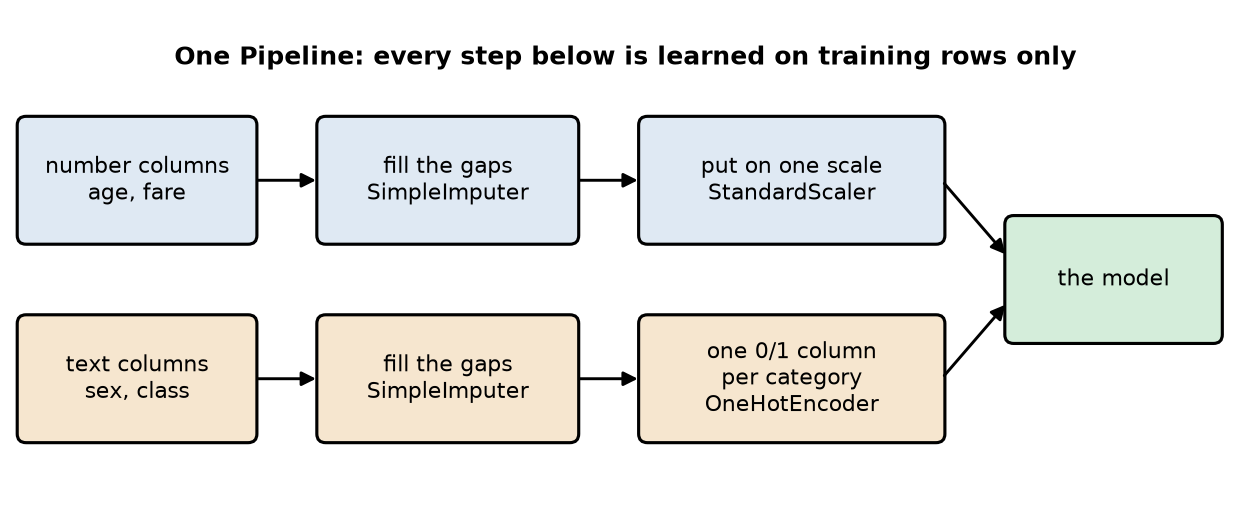
Today’s answer is a pipeline: one object that holds the cleaning, the encoding, the scaling, and the model. You fit it once. It does the steps in order, learns them on training rows only, and repeats them exactly on any new data you hand it. Then we let the computer search for good settings, and open the test set once.

New data today, because our wine has no missing values and no text columns. We are using the Titanic passenger list, which has both.

Load the data and a Look at the Mess

# RUN THIS. The passenger list.
import numpy as np
import pandas as pd
import matplotlib.pyplot as plt

titanic = pd.read_csv("data/titanic.csv")

print("rows and columns:", titanic.shape)
print("share who survived:", round(titanic["survived"].mean(), 3))
print()
print("missing values per column:")
print(titanic.isna().sum()[titanic.isna().sum() > 0])
rows and columns: (891, 15)
share who survived: 0.384

missing values per column:
age            177
embarked         2
deck           688
embark_town      2
dtype: int64
titanic['alive'].value_counts()
alive
no     549
yes    342
Name: count, dtype: int64

This data set has 891 passengers, 38 percent of whom survived. Three columns have NAs in them: age is missing for 177 people, deck for 688, and embarked for 2.

NOTE: This command is doing a lot of work

titanic.isna().sum()[titanic.isna().sum() > 0]

but if you unpack it a bit we are:

  • Going to each entry in the data to see if it is NA
  • Adding these up along the columns where T=1 and F=0
  • Then in [] only show the results where there are NAs so we don’t see a bunch of zeros.

Before we build anything, we have to choose columns to use as our input data. Remember two of the choices from before:

  • alive is the word “yes” or “no”, and it is exactly the survived column in different words. A model given alive scores 100 percent and has learned nothing. Drop it.
  • deck is missing for 688 of 891 passengers. Filling in 77 percent of a column is inventing data. Drop it.
  • class, embark_town and adult_male repeat pclass, embarked and who. Keep one of each.

That leaves nine columns worth using, and they come in two kinds.

# LEARN TO WRITE THIS. Two kinds of column, and they need different treatment.

# NUMERICAL DATA
number_columns = ["age", "sibsp", "parch", "fare"]  # sibsp and parch: siblings and parents aboard
# CATEGORICAL DATA
text_columns = ["pclass", "sex", "embarked", "who", "alone"]

X = titanic[number_columns + text_columns]
y = titanic["survived"]

# Look at the data
display(X.head(3))
print()
# Check for missing data again
print("missing values in the columns we kept:")
print(X.isna().sum()[X.isna().sum() > 0])
age sibsp parch fare pclass sex embarked who alone
0 22.0 1 0 7.2500 3 male S man False
1 38.0 1 0 71.2833 1 female C woman False
2 26.0 0 0 7.9250 3 female S woman True

missing values in the columns we kept:
age         177
embarked      2
dtype: int64
Q1. Write this one out by hand

a. alive says “yes” or “no” and survived says 1 or 0, for the same passenger. What would happen to your accuracy if you left alive in, and why is that number worthless?

b. deck is missing for 688 of 891 passengers. What could go wrong if you filled those in with the most common deck and used the column anyway?

c. pclass is written as 1, 2, 3. It is already a number, so why did we put it in the text list instead of the number list? (Hint: is a third class ticket three times a first class ticket?)

Do the Split!

Here we did a little bit of looking at the data, but mostly just value counts and checking for NAs. Before we do anything else we must do our test train split!

# LEARN TO WRITE THIS. The same two splits as every day since Day 5.
from sklearn.model_selection import train_test_split

X_train_full, X_test, y_train_full, y_test = train_test_split(
    X, y, test_size=0.25, stratify=y, random_state=42)

X_train, X_valid, y_train, y_valid = train_test_split(
    X_train_full, y_train_full, test_size=0.25, stratify=y_train_full, random_state=42)

print("training rows:  ", len(X_train))
print("validation rows:", len(X_valid))
print("test rows:      ", len(X_test), "  (closed until the end)")
training rows:   501
validation rows: 167
test rows:       223   (closed until the end)

Why Not Just Clean It By Hand?

Everything that you do by hand had to be done carefully, using only information from the training data, but then applied exactly the same way to the validation and at the very end the testing data. Say you want to do something simple like fill missing ages with the average age. You would have to first calculate the average age based on only the training data, remember that number for the future of the model, fill missing values in the training data, the validation data, and the testing data. If you forget just one, everything is messed up. Or if you calculate that average using information outside the training data you have leakage. This is an easy mistake to make. Here are some tools we can use:

Pipeline - chains a sequence of things into one object that behaves like a single model. Calling .fit() fits each step in order on the training data only, and .predict() runs new data through the same chain, which is what prevents data leakage from preprocessing steps.

SimpleImputer - fills missing values (NaN) using a specified strategy: mean, median, most-frequent, or a constant. Fit on training data (learns the fill value), then applied to both train and test with that same learned value.

OneHotEncoder - converts a categorical column into multiple binary (0/1) columns, one per category. We used get_dummies() before, this does the same thing.

StandardScaler - rescales each numeric feature to zero mean and unit variance: z = \frac{x - \mu}{\sigma}. Matters for distance-based or gradient-based models (SVM, KNN, linear/logistic regression, neural nets); tree-based models (RF, GBR, XGBoost) are invariant to it and don’t need it.


Different Columns, Different Treatment

Numbers and text cannot be cleaned the same way.

  • A missing age should be filled with a number, say the median age.
  • A missing port should be filled with a category, say the most common port.
  • Numbers should be put on one scale, as they were on Day 5.
  • Text has to become numbers first, one column per category, which is what get_dummies did. The pipeline version is called OneHotEncoder.

ColumnTransformer - applies different preprocessing steps to different subsets of columns in a single object, e.g. scaling numeric columns while one-hot encoding categorical ones. Outputs are put back together and ready for the model

# LEARN TO WRITE THIS. One path for numbers, one for text.
from sklearn.compose import ColumnTransformer
from sklearn.pipeline import Pipeline
from sklearn.impute import SimpleImputer
from sklearn.preprocessing import OneHotEncoder, StandardScaler

# Create a pipeline for the numerical data
number_path = Pipeline([
    ("fill", SimpleImputer(strategy="median")),     # missing age becomes the median age
    ("scale", StandardScaler())])

# Create a pipeline for the categorical data
text_path = Pipeline([
    ("fill", SimpleImputer(strategy="most_frequent")),      # missing port becomes the most common port
    ("dummy", OneHotEncoder(handle_unknown="ignore"))])     # one 0/1 column per category. More on the flag below

# Create a preprocessing step that tracks both pipelines above
# we defined number_columns and text_columns above
preprocessing = ColumnTransformer([
    ("num", number_path, number_columns),      
    ("cat", text_path, text_columns)])

# Do all of the preprocessing of the data in a single step
preprocessing.fit(X_train)       # learns the medians, the most common values, and the category lists

print("columns in: ", X_train.shape[1])
print("columns out:", preprocessing.transform(X_train).shape[1])
print()
columns in:  9
columns out: 17

Nine columns in, seventeen out. The four numerical columns stay as four columns, filled in and scaled. The five text columns turn into thirteen 0/1 columns, one per category in the training data.

Notice that preprocessing.fit(X_train) is where the learning happens. The median age, the most common port, and the list of categories all come from the training rows and nowhere else.

About handle_unknown="ignore". Next year a passenger list might contain a port your training data never had. Without this flag the encoder raises an error and your program stops. With it, the unknown category becomes all zeros and the model still gives an answer. In a live system that is the difference between a prediction and a 3am phone call from your boss about a crashing model.

Q2. Write this one out by hand

a. A passenger has no age recorded. Walk through what happens to that row as it goes down the number path.

b. Why does sex need OneHotEncoder but fare does not?

c. SimpleImputer(strategy="median") learned one number from the training rows. Which rows should it be used on afterward, and which should it never be recomputed on?


The Whole Thing As One Object

We can add one more pipeline. Above we had the preprocessing step as a set of pipelines. Now we put that in with a model and we have everything in one workflow!

# LEARN TO WRITE THIS. Preprocessing and model, one object.
from sklearn.linear_model import LogisticRegression
from sklearn.metrics import accuracy_score, average_precision_score

full_pipeline = Pipeline([
    ("prep", preprocessing),
    ("model", LogisticRegression(max_iter=5000))])

full_pipeline.fit(X_train, y_train)      # fills, scales, encodes, and fits the model, in that order

y_prob = full_pipeline.predict_proba(X_valid)[:, 1]     # does the same steps to the validation rows

print("validation accuracy:        ", round(accuracy_score(y_valid, (y_prob >= 0.5)), 3))
print("validation average precision:", round(average_precision_score(y_valid, y_prob), 3))
validation accuracy:         0.838
validation average precision: 0.873

We only have to call fit once, predict_proba once, and there is no chance of forgetting a step or leaking a median from the validation set.

Trying different models

Swapping the model is now a one line change, which makes comparing models easy. Here we will compare three different models all within a single for loop and we don’t lose any of our preprocessing steps we decided above.

# LEARN TO WRITE THIS. Same preprocessing, three models.
from sklearn.ensemble import RandomForestClassifier
from xgboost import XGBClassifier

models = [("logistic regression", LogisticRegression(max_iter=5000)),
          ("random forest", RandomForestClassifier(n_estimators=200, random_state=42)),
          ("boosting", XGBClassifier(random_state=42))]

for name, model in models:
    pipe = Pipeline([("prep", preprocessing), ("model", model)])
    pipe.fit(X_train, y_train)
    ap = average_precision_score(y_valid, pipe.predict_proba(X_valid)[:, 1])
    print(name, "  validation average precision:", round(ap, 3))
logistic regression   validation average precision: 0.873
random forest   validation average precision: 0.857
boosting   validation average precision: 0.885

Great we got three numbers! Do we just say boosting is best?!?!?

from sklearn.model_selection import cross_val_score, RepeatedStratifiedKFold

# Cross Validation
cv = RepeatedStratifiedKFold(
    n_splits=5,        # 5 folds
    n_repeats=4,       # done 4 times with different shuffles, so 20 fits per model
    random_state=42)

for name, model in models:
    pipe = Pipeline([("prep", preprocessing), ("model", model)])
    scores = cross_val_score(pipe, X_train_full, y_train_full, cv=cv, scoring="average_precision")
    print(name)
    print("   mean average precision:", round(scores.mean(), 3))
    print("   standard deviation:    ", round(scores.std(), 3))
    print("   worst and best fold:   ", round(scores.min(), 3), "to", round(scores.max(), 3))
logistic regression
   mean average precision: 0.846
   standard deviation:     0.035
   worst and best fold:    0.769 to 0.897
random forest
   mean average precision: 0.816
   standard deviation:     0.05
   worst and best fold:    0.715 to 0.897
boosting
   mean average precision: 0.838
   standard deviation:     0.041
   worst and best fold:    0.759 to 0.892

Now we can evaluate each model and compare it to the noise in the cross validation.

Q3. Write this one out by hand

a. Day 4 said any step with a .fit() has to live inside the pipeline. Name the three steps inside ours that have a .fit(), and say what each one learns.

b. When cross_val_score runs on a pipeline, the whole pipeline is refitted on each fold. Why does that matter for the imputer and the scaler?

c. What single line would you change to try decision tree instead of logistic regression?


Randomized GridSearch

When the list of settings gets long, trying every possible combination can take a really long time. A randomized grid search can help by sampling a set of combinations rather than trying them all. It adds a bit of randomness, but you get decide how many fits you can afford.

# LEARN TO WRITE THIS. Sample the settings instead of trying all of them.
from sklearn.model_selection import RandomizedSearchCV
from scipy.stats import randint

search_grid = {"model__n_estimators": randint(100, 400),      # a range to draw from, not a list
                 "model__max_depth": [None, 5, 10, 20],
                 "model__min_samples_leaf": randint(1, 10)}

random_search = RandomizedSearchCV(
    search_pipeline,
    search_grid,
    n_iter=8,                                        # how many combinations to try. This is your budget
    cv=StratifiedKFold(5, shuffle=True, random_state=42),
    scoring="average_precision",
    random_state=42)

random_search.fit(X_train_full, y_train_full)

print('best parameters:', random_search.best_params_)
print("best cross validated average precision:", round(random_search.best_score_, 3))
best parameters: {'model__max_depth': None, 'model__min_samples_leaf': 7, 'model__n_estimators': 221}
best cross validated average precision: 0.85

Eight combinations, forty tries, and the same 0.850. With a small grid like ours the two approaches tie. The difference shows up when you have six different settings to tune: the grid multiplies out to thousands of tries, while the random search still costs whatever budget you gave it, and it can try a wide range different values of one setting instead of just the few you thought to list.

Q4. Write this one out by hand

a. Why is it model__n_estimators and not n_estimators? What would prep__num__fill__strategy reach?

b. Our grid had 2 times 3 times 2 combinations and 5 folds. Work out the number of fits. Now add one more setting with 4 choices and work it out again.

c. After the search finishes, grid_search.best_estimator_ is ready to predict. What data was it fitted on, and why can we not score it on X_valid?


The Test Set, Once

Okay, based on what we have above. Lets make our final choices! We will use what grid search chose for us above and then run the whole pipeline, with the best parameters, all in one go.

# LEARN TO WRITE THIS. Score the winner, once.
from sklearn.metrics import confusion_matrix, precision_score, recall_score

best = grid_search.best_estimator_          # the winning pipeline, already refitted on all the training data

y_prob_test = best.predict_proba(X_test)[:, 1]
y_pred_test = (y_prob_test >= 0.5).astype(int)

print(confusion_matrix(y_test, y_pred_test))
print("test accuracy:         ", round(accuracy_score(y_test, y_pred_test), 3))
print("test precision:        ", round(precision_score(y_test, y_pred_test), 3))
print("test recall:           ", round(recall_score(y_test, y_pred_test), 3))
print("test average precision:", round(average_precision_score(y_test, y_prob_test), 3))
[[127  10]
 [ 34  52]]
test accuracy:          0.803
test precision:         0.839
test recall:            0.605
test average precision: 0.831

On 223 passengers the model never saw: accuracy 0.803, precision 0.839, recall 0.605, average precision 0.831.

Read the confusion matrix before you read the accuracy. The model finds 52 of the 86 survivors and misses 34 of them, so it is much better at predicting who died than who lived. It is careful to think about what the confusion matrix means and report clearly what your model can and cannot do.

Q5. Write this one out by hand

a. Write one sentence reporting this result, the way you would to somebody who has not taken this class.

b. The cross validated score during the search was 0.850 and the test average precision is 0.831. Is that a problem? What would you say if it had been 0.55?


Keeping the Model

A pipeline can be saved to a file and loaded back later, ready to predict. This is how a model gets out of a notebook and used in other applications.

# RUN THIS. Save the whole pipeline, load it back, check it still agrees.
import joblib

joblib.dump(best, "titanic_pipeline.joblib")

loaded = joblib.load("titanic_pipeline.joblib")
same = np.allclose(best.predict_proba(X_test)[:, 1], loaded.predict_proba(X_test)[:, 1])

print("saved and loaded, predictions identical:", same)
saved and loaded, predictions identical: True

The file holds the medians, the category lists, the scaler, and the trained model together. That is the point of saving the pipeline rather than the model: a saved model alone would arrive with no idea how its data was prepared, and you would have to rebuild all of it correctly from memory.

Q6. Write this one out by hand

a. You save only the RandomForestClassifier, not the pipeline, and email it to a colleague with the raw passenger list. List two things that will go wrong when they try to use it.

b. A year from now the ship company sends a new list with a port code your model has never seen. What does your pipeline do, and which line made that true?


Putting It Together

The shape of every project from here on, including your final project:

  1. Choose columns. Drop what leaks, what duplicates, and what is mostly missing.
  2. Split first, stratified. Test set away.
  3. One ColumnTransformer: numbers get filled and scaled, text gets filled and one-hot encoded.
  4. One Pipeline: preprocessing plus a model, so every step is learned on training rows only and repeated exactly.
  5. Search with GridSearchCV for a few settings, RandomizedSearchCV when there are many. Cross validation inside the search does the validating.
  6. Test once, report the confusion matrix along with the score.
  7. Save the pipeline, not the model.

New Commands Today

Command What it does The thing that trips people up
SimpleImputer(strategy="median") fills missing values "median" for numbers, "most_frequent" for text. It learns the value from the training rows
OneHotEncoder(handle_unknown="ignore") one 0/1 column per category without the flag, a category it never saw during training raises an error instead of predicting
StandardScaler() puts numbers on one scale trees do not need it, logistic regression and nearest neighbors do
ColumnTransformer([(name, what, columns), ...]) sends different columns down different paths the third item is the list of column names. Anything you leave out is dropped
Pipeline([("prep", ...), ("model", ...)]) the steps as one object the names you pick become the prefixes in a search
GridSearchCV(pipe, grid, cv=, scoring=) tries every combination with cross validation settings inside a pipeline need the step__setting name. Fits = combinations times folds
RandomizedSearchCV(pipe, space, n_iter=) samples combinations instead n_iter is your budget. Ranges like randint(100, 400) beat a short list
.best_params_, .best_score_, .best_estimator_ what the search found best_estimator_ is already refitted on everything you gave the search
joblib.dump(pipe, "file") and joblib.load save and reload save the pipeline, so the preprocessing travels with the model
You Try: optional code

Nothing here is collected. Work through it if you want the idea to stick.

1. Change the number path to SimpleImputer(strategy="mean"). Does anything move? Now try strategy="constant", fill_value=0 and explain what that does to a missing age.

2. Put deck back in the text columns and refit. What happens to the validation score, and what did you just teach the model about 688 passengers?

3. Give the grid a fourth setting to search over and run it again. Time it. Then do the same search with RandomizedSearchCV and n_iter=8.

4. Swap LogisticRegression for HistGradientBoostingClassifier and drop the imputer from the number path. It handles missing values itself. Does the score change?

Before Next Class

  1. In your lecture notes notebook, add your hand written notes and answers to the questions.
  2. Do the Day 8 practice problems in HW_day8.ipynb.
  3. Weekly Homework 4 is due Friday 10/2 at 11:59pm. It covers Day 7 and Day 8, and it is the bank marketing data again, done properly this time.
  4. Thursday 10/1 is a catch-up day. No new material. Bring questions, because Exam 1 comes out after class on Thursday 10/1 and covers Units 1 and 2, which is everything from Day 1 through today.
  5. Review Geron chapters 1 through 6.

After the catch-up day, Unit 3 starts and everything changes: we stop using models that somebody else wrote and start building neural networks from parts.

Answers to the Q Boxes

Try every one of these by hand first. These are short summaries, not full answers, and the writing out is the part that does the work.

a. Accuracy would be 100 percent, because alive is the answer, written as a word. The number is worthless because you will never have that column for a passenger whose fate you are trying to predict. This is the Day 4 leak in its purest form.

b. You would be inventing a deck for 688 passengers, then letting the model find patterns in your invention. Worse, whether a deck was recorded at all is probably related to ticket class, so the column partly encodes something you already have.

c. Because the numbers 1, 2 and 3 are labels, not amounts. Treating them as numbers tells the model that third class is three times first class, and that the difference between first and second equals the difference between second and third. One-hot encoding says only “this passenger is in second class”.

a. The imputer replaces the missing age with the median age it learned from the training rows, 29.0. Then the scaler subtracts the training mean and divides by the training standard deviation. The row arrives at the model as a number like any other.

b. fare is already a number where bigger means more. sex is a word, and there is no number that means “female” without also implying an order or a size. One column per category avoids inventing either.

c. Use it on validation data, test data, and any new data. Never recompute it on those. The moment the median is recomputed on data that includes the test set, the test score stops being honest.

a. The imputer learns the median age and the most common port. The scaler learns a mean and a standard deviation for each number column. The encoder learns the list of categories in each text column. (The model has a .fit() too, of course, and that is the fourth.)

b. Because each fold’s imputer and scaler must be learned from that fold’s training part only. If they were learned once on everything, every fold’s score would include a little information from the rows it was supposed to be tested on, and every score would be slightly too good.

c. The model line: ("model", HistGradientBoostingClassifier(random_state=42)). Nothing else changes, which is the whole point of the pipeline.

a. Because the setting lives inside a step. model__n_estimators means “the n_estimators of the step named model”. prep__num__fill__strategy reaches the strategy of the step named fill, inside the path named num, inside the step named prep: it would let you search over whether to impute with the median or the mean.

b. 2 times 3 times 2 is 12 combinations, times 5 folds, so 60 fits. Add a setting with 4 choices: 48 combinations, 240 fits. That is how grids get expensive, and it is why randomized search exists.

c. It was fitted on everything handed to the search, which is X_train_full, training plus validation. We cannot score it on X_valid because those rows are inside that set, so the model has already seen them. The test set is the only untouched data left.

a. Something like: “On 223 passengers the model had never seen, it identified 52 of the 86 who survived and was right about 84 percent of the people it flagged as survivors.”

b. 0.850 against 0.831 is not a problem. The search score is a little optimistic because we picked the winner out of twelve candidates, and the test set is a different sample of passengers. A drop to 0.55 would be a problem, and it would mean the settings we chose fit the training folds rather than anything real.

a. The model expects seventeen columns in a particular order, and the raw list has nine of mixed types, so it will error out or, worse, silently accept nonsense. Your colleague also has no way to know the median age or the category lists your training data produced, so even rebuilt by hand their preprocessing would differ from yours.

b. It predicts anyway, treating the unknown port as none of the known ports (all zeros). handle_unknown="ignore" in the OneHotEncoder is the line that made that true. Without it the whole thing raises an error.