Blue Q boxes are questions for you to answer by hand, in a notebook, with a pen. Not because I am old fashioned. Writing something down by hand is slow, and slow is the point: it is very hard to write an explanation you do not actually understand. You are welcome to use AI in this class for the mechanics of code, but these boxes are the part where you do the thinking yourself. Bring your written notes to class, I will ask to see them.
Green You Try boxes are optional code for you to work through. Nothing is collected and nothing is graded. They are there because you will learn more from changing a number and rerunning than from watching me do it.
Every code cell begins with a tag that tells you what to do with it.
# RUN THIS. Setup, loading data, a plot. Copy it, run it, move on. You do not need to be able to write it from memory.
# LEARN TO WRITE THIS. The pattern of the day. The homework will ask you for it, and so will the exam. Type it out yourself at least once rather than pasting it.
# DEMO ONLY. Code that exists to show one idea. You do not need to be able to write it yourself.
# UNDERSTAND THESE STEPS. Code that shows how something works inside, one small step at a time. Read it and make sure you understand what each line does. You do not need to memorize it or be able to write it from scratch.
Reading: Geron chapter 9, the section From Biological to Artificial Neurons, and chapter 10, the section PyTorch Fundamentals (Tensors, Hardware Acceleration, and Autograd).
Welcome to Unit 3: Neural Networks!
Up to now every model we used was written by somebody else. We called LogisticRegression() and .fit(), and scikit-learn did all the work. Starting today we build models ourselves, one piece at a time, so we can see how they work.
We start with a model we already know really well. We have used logistic regression since Day 4. Today we rebuild it in PyTorch. It turns out that logistic regression is a neuron! On Thursday we connect a lot of neurons together to make a neural network.
Here is the plan for today:
Fit logistic regression on the wine data one more time, with scikit-learn.
Draw it as a neuron.
Learn tensors, the way PyTorch holds numbers, and use them to get the same probabilities scikit-learn got.
Learn autograd, the part of PyTorch that does the calculus for us.
Use autograd and gradient descent to teach a neuron from scratch, and check that it learns what scikit-learn learned.
NOTE - Today we build everything by hand so you can see each piece on its own: the weights, the weighted sum, the loss, the derivatives and the update. You do NOT need to memorize this code. On Thursday PyTorch’s tools do most of it for us. What you DO need to understand is what each piece does, because those same pieces are inside every neural network we train. The one line you will keep writing is loss.backward().
NOTE - Today is also the day your handwritten Exam 1 essays are due. Hand them in at the start of class!
Logistic Regression One More Time
Same wine data as Day 5 and Weekly Homework 2. A wine is good if its quality score is 7 or 8.
# RUN THIS. Imports and the wine data.import numpy as npimport pandas as pdimport matplotlib.pyplot as pltwine = pd.read_csv("data/winequality-red.csv", sep=";") # sep=";" because this file uses semicolons, not commaswine["good"] = (wine["quality"] >=7).astype(int) # 1 if the wine is good, 0 if notprint("rows and columns:", wine.shape)print("share of good wines:", round(wine["good"].mean(), 3))
rows and columns: (1599, 13)
share of good wines: 0.136
Today we are not choosing a final model. Instead we are checking that two ways of building the same model agree. So we only need a training set and a validation set. There is no test set today.
We scale the features, just like we did on Day 5. Logistic regression needs scaled features. Neural networks need them too, so we will scale our features for the rest of the semester.
wine.head()
fixed acidity
volatile acidity
citric acid
residual sugar
chlorides
free sulfur dioxide
total sulfur dioxide
density
pH
sulphates
alcohol
quality
good
0
7.4
0.70
0.00
1.9
0.076
11.0
34.0
0.9978
3.51
0.56
9.4
5
0
1
7.8
0.88
0.00
2.6
0.098
25.0
67.0
0.9968
3.20
0.68
9.8
5
0
2
7.8
0.76
0.04
2.3
0.092
15.0
54.0
0.9970
3.26
0.65
9.8
5
0
3
11.2
0.28
0.56
1.9
0.075
17.0
60.0
0.9980
3.16
0.58
9.8
6
0
4
7.4
0.70
0.00
1.9
0.076
11.0
34.0
0.9978
3.51
0.56
9.4
5
0
# RUN THIS. Features, label, split, scale. All of this is from Day 5.from sklearn.model_selection import train_test_splitfrom sklearn.preprocessing import StandardScalerfrom sklearn.pipeline import PipelineX = wine.drop(columns=["quality", "good"])y = wine["good"]X_train, X_valid, y_train, y_valid = train_test_split( X, y, test_size=0.25, stratify=y, # keep the same share of good wines in both sets random_state=42)# The preprocessing pipeline. Today it is only a scaler, but we still# put it in a pipeline so our code looks the same every time.preprocessing = Pipeline([ ("scale", StandardScaler())])X_train_scaled = preprocessing.fit_transform(X_train) # learn the mean and std from the training rowsX_valid_scaled = preprocessing.transform(X_valid) # reuse them on the validation rowsprint("training rows:", X_train_scaled.shape)print("validation rows:", X_valid_scaled.shape)
training rows: (1199, 11)
validation rows: (400, 11)
Now the model. We use C=np.inf, which means no regularization at all. Remember from the Exam that C is like 1/alpha from Day 3, so a huge C means the penalty is basically zero. We do this so that scikit-learn and our neuron are solving exactly the same problem. Otherwise scikit-learn would add a penalty and our neuron would not, and they would find different weights.
Just like Day 8, the scikit-learn model goes in a full pipeline with the preprocessing, and we fit it on the raw training rows. Then named_steps["model"] pulls the fitted model back out of the pipeline, so we can look at the weights it learned.
# LEARN TO WRITE THIS. The model we are about to rebuild.from sklearn.linear_model import LogisticRegressionfrom sklearn.metrics import accuracy_scorelog_reg_pipeline = Pipeline([ ("prep", preprocessing), # the same preprocessing as above ("model", LogisticRegression( C=np.inf))]) # C is like 1/alpha, so C=np.inf turns regularization offlog_reg_pipeline.fit(X_train, y_train) # the raw rows, the pipeline scales them for usy_pred_sklearn = log_reg_pipeline.predict(X_valid)print("validation accuracy:", round(accuracy_score(y_valid, y_pred_sklearn), 3))# the fitted LogisticRegression inside the pipeline, so we can look at its weightslog_reg = log_reg_pipeline.named_steps["model"]
validation accuracy: 0.892
# RUN THIS. The twelve numbers logistic regression learned.weights = pd.Series(log_reg.coef_[0], index=X.columns) # coef_ is a 1 by 11 array, [0] takes the one rowprint(weights.round(3))print()print("bias (intercept):", round(log_reg.intercept_[0], 3))
What did the model actually learn? It learned eleven weights, one per feature, and one more number called the intercept or bias. The model uses these twelve numbers to make every prediction.
Alcohol has the biggest positive weight, so more alcohol pushes a wine toward “good”. Total sulfur dioxide and volatile acidity have big negative weights, so more of them pushes a wine toward “not good”. Since the features are all scaled, we can compare the sizes of the weights to each other.
Logistic Regression is a Neuron
Here is what logistic regression does with one wine, in two steps.
Step 1: a weighted sum. Multiply each feature by its weight, add them all up, and add the bias:
z = w_1 x_1 + w_2 x_2 + \dots + w_{11} x_{11} + b
Step 2: the sigmoid. Put z through the sigmoid from Day 4, which turns any number into a probability between 0 and 1:
p = \sigma(z) = \frac{1}{1 + e^{-z}}
Now draw that as a picture:
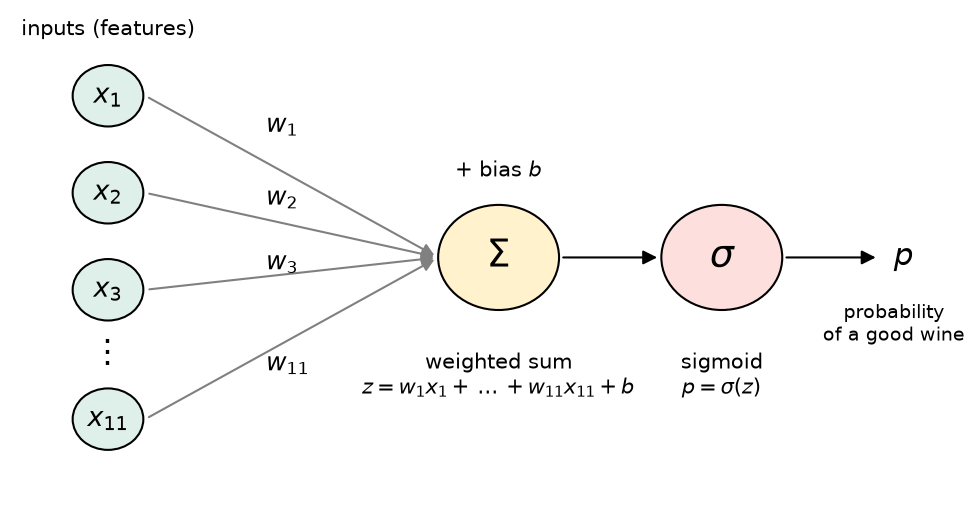
One neuron. The inputs are multiplied by their weights and added up with the bias, then the sigmoid turns the sum into a probability.
This picture is an artificial neuron. The idea comes from biology. A biological neuron receives signals from other neurons and fires if the total signal is big enough. An artificial neuron multiplies each input by its weight, adds them up with the bias, and then applies an activation function to the sum. Here the activation function is the sigmoid.
So a neuron with a sigmoid activation function is exactly logistic regression. It uses the same equation and the same twelve numbers.
The reading also describes the perceptron from 1957. It is the same picture, but the activation is a step: it outputs 1 if z \geq 0 and 0 otherwise. So a perceptron gives a 0 or a 1 and never a probability.
Why draw the picture if the math is the same? The picture shows how neurons can be connected: the outputs of one row of neurons become the inputs of the next row. Neurons connected this way make a neural network, which we build on Thursday.
NoteQ1. Write this one out by hand
a. Draw the neuron for a model with only two features, alcohol and volatile acidity. Label the inputs, the weights, the bias, the sum and the activation.
b. Use the weights and bias printed above. Imagine a wine has scaled alcohol 1 and scaled volatile acidity 0.5 as input features into the model, and every other scaled feature is 0. Write down z and then p. (You can use a calculator for e^{-z}.)
Tensors
A tensor is PyTorch’s version of a numpy array. It holds numbers in a grid with a shape, and you can do math with it. If you know numpy, you already know most of this! Tensors can do two things numpy arrays can not:
They can run on a GPU - really fast.
They can keep a record of every calculation, so PyTorch can compute derivatives for us. This is called autograd, and it is the next section.
# RUN THIS. Make sure PyTorch is installed and imports.import torchprint("PyTorch version:", torch.__version__)
PyTorch version: 2.14.0+cu130
# LEARN TO WRITE THIS. Making tensors.a = torch.tensor([1.0, 2.0, 3.0]) # from a list, just like np.arrayprint(a)print("shape:", a.shape)print("type of numbers:", a.dtype)B = torch.tensor([[1.0, 2.0, 3.0], [4.0, 5.0, 6.0]]) # two rows, three columnsprint(B)print("shape:", B.shape)
tensor([1., 2., 3.])
shape: torch.Size([3])
type of numbers: torch.float32
tensor([[1., 2., 3.],
        [4., 5., 6.]])
shape: torch.Size([2, 3])
This should feel just like numpy. The new symbol is @, which is matrix multiplication. B @ a multiplies each row of B by a, number by number, and adds them up. That is one weighted sum per row!
# LEARN TO WRITE THIS. Math with tensors.print("a times 2:", a *2)print("a plus a:", a + a)print("B @ a:", B @ a) # row 1: 1*1 + 2*2 + 3*3 = 14, row 2: 4*1 + 5*2 + 6*3 = 32
a times 2: tensor([2., 4., 6.])
a plus a: tensor([2., 4., 6.])
B @ a: tensor([14., 32.])
Now let’s turn our wine data into tensors. There is one thing to watch out for here.
NOTE - PyTorch uses 32 bit numbers (float32) by default, and numpy uses 64 bit numbers (float64). If you mix them in one calculation, PyTorch stops with an error. So every time we turn numpy data into a tensor, we ask for float32 on purpose.
# LEARN TO WRITE THIS. The wine data as tensors.X_train_t = torch.tensor(X_train_scaled, dtype=torch.float32) # dtype=torch.float32 so it matches PyTorch's defaulty_train_t = torch.tensor(y_train.values, dtype=torch.float32) # .values takes the numbers out of the pandas columnX_valid_t = torch.tensor(X_valid_scaled, dtype=torch.float32)print("X_train_t shape:", X_train_t.shape)print("y_train_t shape:", y_train_t.shape)
Let’s use tensors to do what logistic regression does: 1. Take twelve weights we learned with logistic regression above 2. Put them in tensors 3. Compute the weighted sum 4. Calculate the sigmoid
… for every training wine at once - Yay computers!
The shapes work out like this: X_train_t is 1199 by 11 and w has 11 numbers, so X_train_t @ w gives 1199 numbers, one weighted sum for each wine.
# UNDERSTAND THESE STEPS. One neuron, using the weights scikit-learn found.w = torch.tensor(log_reg.coef_[0], dtype=torch.float32) # the 11 weightsb = torch.tensor(log_reg.intercept_[0], dtype=torch.float32) # the biasz = X_train_t @ w + b # Step 1: the weighted sum for every winep = torch.sigmoid(z) # Step 2: squash it into a probabilityprint("shape of z:", z.shape)print("first five probabilities:", p[:5])
shape of z: torch.Size([1199])
first five probabilities: tensor([0.0789, 0.4896, 0.0686, 0.0494, 0.1460])
# RUN THIS. Compare to scikit-learn's own probabilities.p_sklearn = log_reg.predict_proba(X_train_scaled)[:, 1] # [:, 1] keeps P(good)difference = np.abs(p.numpy() - p_sklearn) # .numpy() turns a tensor back into a numpy arrayprint("first five from sklearn:", np.round(p_sklearn[:5], 4))print("biggest difference:", difference.max())
first five from sklearn: [0.0789 0.4896 0.0686 0.0494 0.146 ]
biggest difference: 1.219406287611413e-07
The biggest difference is about 0.0000001. That is just rounding, because we used 32 bit numbers. Two lines of PyTorch did everything predict_proba does!
However, we used the weights that scikit-learn learned. Next we want to find those weights ourselves, and for that we need calculus.
NoteQ2. Write this one out by hand
a.X_train_t has shape 1199 by 11 and w has shape 11. What is the shape of X_train_t @ w? What does each number in it mean for the wines?
b. Write out by hand what B @ a computes for B = [[1, 0, 2], [3, 1, 1]] and a = [2, 5, 1].
Autograd
Autograd (automatic gradients) is the part of PyTorch that computes derivatives for us.
Start with something we can check by hand. For f(x) = x^2, calculus says f'(x) = 2x, so at x = 3 the slope is 6. Let’s ask PyTorch.
# UNDERSTAND THESE STEPS. Autograd on one number.x = torch.tensor(3.0, requires_grad=True) # requires_grad=True: keep track of every calculation that uses x# Do a calculation that we can take the derivative off = x **2# PyTorch remembers how f was made from xf.backward() # do the calculus: find the derivative of f with respect to xprint("f:", f)print("df/dx at x = 3:", x.grad)
f: tensor(9., grad_fn=<PowBackward0>)
df/dx at x = 3: tensor(6.)
Three things happened.
requires_grad=True told PyTorch to watch x and that we are going to be taking derivatives of it.
Every calculation that used x got recorded, so PyTorch knows that f came from squaring x.
f.backward() went back through the recorded calculations and computed the derivative. The answer is stored in x.grad.
It works with more than one variable too. For f(a, b) = a \cdot b + b^2. When we are at a = 2, b = 3, the partial derivatives are \frac{\partial f}{\partial a} = b = 3 and \frac{\partial f}{\partial b} = a + 2b = 8. Remember partial derivatives are taken by pretending like all the variables are a constant except for the one you are taking the derivative of.
# UNDERSTAND THESE STEPS. Autograd with two variables.# Mostly you want to learn how to turn something into a tensor that requires grad# and how to call .backward() to calculate the gradient (derivatives or slopes)a = torch.tensor(2.0, requires_grad=True)b = torch.tensor(3.0, requires_grad=True)f = a * b + b **2f.backward()print("df/da:", a.grad)print("df/db:", b.grad)
df/da: tensor(3.)
df/db: tensor(8.)
BEWARE! Autograd adds new derivatives to whatever is already stored in .grad. It does not replace it.
Watch what happens if we do the same calculation twice without clearing it.
# DEMO ONLY. What happens if you forget to clear .gradx = torch.tensor(3.0, requires_grad=True)f = x **2f.backward()print("after one backward:", x.grad)f = x **2f.backward()print("after two backwards:", x.grad) # 6 + 6 = 12, not the slope any more
after one backward: tensor(6.)
after two backwards: tensor(12.)
The slope did not change, but x.grad now says 12. So every time we compute a new derivative we have to clear the old one first with x.grad.zero_(). This matters when we write the training loop below.
NoteQ3. Write this one out by hand
a. For f(x) = x^3 - 2x, find f'(2) by hand, get help from a friend if you have not done calculus in a while. Then write the three lines of PyTorch that would check your answer.
b. Why did x.grad say 12 after the second backward? What line would you add to get the right answer?
How Wrong Is the Neuron? The Loss
To teach the neuron we need one number that says how wrong it is. Then we can use calculus to make that number smaller. This number is called the loss. Choosing your loss function is an important part of machine learning!
When training a logistic regression model, how do we find the weights? Logistic regression uses the log loss (PyTorch calls it binary cross entropy). For each wine it looks at the probability the neuron gave to the right answer:
If the wine is good (y = 1), the loss is -\log(p).
If the wine is not good (y = 0), the loss is -\log(1 - p).
If the neuron gives a good wine a p close to 1, the loss for that wine is close to 0. If it gives a good wine a p close to 0, the loss is really BIG, because -\log(p) grows without bound as p goes to 0.
# UNDERSTAND THESE STEPS. The log lossimport torch.nn.functional as Floss_like_sklearn = F.binary_cross_entropy(p, y_train_t) # p = probabilities we found above when we did the neuron calculation using tensors# y_train_t = the real 0/1 answersprint("loss with scikit-learn's weights:", round(loss_like_sklearn.item(), 4)) # .item() turns a one number tensor into a plain number
loss with scikit-learn's weights: 0.2739
So this is the minimum loss that the sklearn model reached when finding its weights.
Let’s set every weight to 0 and the bias to 0. What loss do we get?
# UNDERSTAND THESE STEPS. The loss for a neuron that knows nothing.w_zero = torch.zeros(11) # 11 weights, all 0b_zero = torch.tensor(0.0)p_zero = torch.sigmoid(X_train_t @ w_zero + b_zero)loss_zero = F.binary_cross_entropy(p_zero, y_train_t)print("first five probabilities:", p_zero[:5])print("loss with zero weights:", round(loss_zero.item(), 4))
first five probabilities: tensor([0.5000, 0.5000, 0.5000, 0.5000, 0.5000])
loss with zero weights: 0.6931
With every weight at zero, z = 0 for every wine, so every probability is exactly 0.5 for every wine. The calculation (averaging across all the wines) gives a loss of 0.6931, which is \log(2). When scikit-learn finds the weights it gets the loss down to 0.2739.
So now the question is: how do we get from 0.6931 to 0.2739 ourselves?
NoteQ4. Write this one out by hand
a. Every probability is 0.5 when the weights are zero. Show by hand that the loss is \log(2) \approx 0.693.
b. Why do we train with the log loss instead of the accuracy? (Hint: think about what happens to the accuracy if you change one weight by a tiny amount. Is it continuous? Does it have a slope?)
Teaching the Neuron: Gradient Descent
Now we have the loss and a way to get derivatives (autograd). With both of these we can do gradient descent, which is how neural networks are trained.
The derivative of the loss with respect to a weight tells us which way is uphill. So we take a small step the other way, downhill:
w = w - \eta \, \frac{\partial L}{\partial w}
The Greek letter \eta (eta) is the learning rate. It controls how big each step is. This is gradient descent from your calculus or math for data science class, and it is also the “something like gradient descent” that we said logistic regression uses back on Day 4.
Here is the recipe. We call one pass through the recipe a step.
Predict: compute the probabilities with the current weights.
Loss: compute how wrong they are.
Backward:loss.backward() finds the derivative of the loss for every weight and the bias.
Update: take a small step downhill by updating all of the weights using the derivative and the learning rate.
Clear: zero out the gradients, so the next step starts fresh.
Then we repeat this a LOT of times.
# UNDERSTAND THESE STEPS. Gradient descent for one neuron.# Start knowing nothing: every weight 0, bias 0. requires_grad=True so autograd tracks them.w = torch.zeros(11, requires_grad=True)b = torch.zeros(1, requires_grad=True)learning_rate =0.1n_steps =2000losses = [] # save the loss at every step so we can plot it# Take a bunch of stepsfor step inrange(n_steps):# 1. Predict p = torch.sigmoid(X_train_t @ w + b)# 2. Loss loss = F.binary_cross_entropy(p, y_train_t) losses.append(loss.item())# 3. Backward: fills in w.grad and b.grad loss.backward()# 4. Update: take a step downhillwith torch.no_grad(): # no_grad: this update is not part of the model# we never want to take derivatives of this calculation# it is an update w -= learning_rate * w.grad # w -= 1 is the same as w = w - 1 b -= learning_rate * b.grad# 5. Clear the gradients for the next step w.grad.zero_() b.grad.zero_()print("loss at the start:", round(losses[0], 4))print("loss at the end: ", round(losses[-1], 4))
loss at the start: 0.6931
loss at the end:   0.274
The loss went from 0.6931 all the way down to 0.274. Our fancy scikit-learn model got 0.2739! And it only takes a second to run.
Two lines in that loop are new and a little strange, so let’s look at them.
with torch.no_grad(): Autograd tracks every calculation on w and b. The update step changes the weights, and it is not part of the model, so we do not want it recorded. no_grad turns the recording off for the lines inside it.
w.grad.zero_() This is the BEWARE from the autograd section. If we skip it, every step adds its gradient on top of all the old ones.
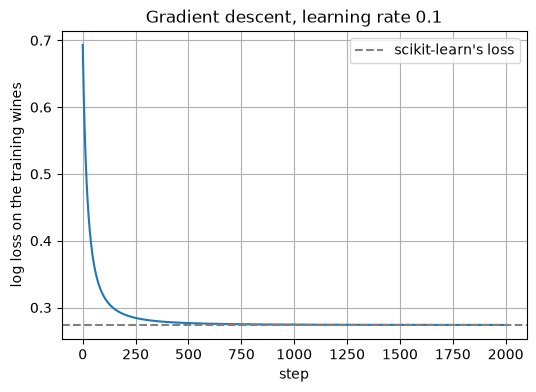
Let’s plot the learning curve, aka the loss for each step the neuron learned.
# RUN THIS. The loss at every step.plt.figure(figsize=(6, 4))plt.plot(losses)plt.axhline(loss_like_sklearn.item(), color="gray", linestyle="--", label="scikit-learn's loss")plt.xlabel("step")plt.ylabel("log loss on the training wines")plt.title("Gradient descent, learning rate 0.1")plt.legend()plt.grid()plt.show()
The loss drops really fast at the start and then flattens out as it gets close to the bottom. This plot is called a learning curve and you will be looking at a LOT of them for the rest of the semester.
Did our neuron learn the same thing as scikit-learn? Let’s put the weights side by side.
# RUN THIS. Our weights next to scikit-learn's.compare = pd.DataFrame({"our neuron": w.detach().numpy(), # .detach() stops tracking, then .numpy() makes it a numpy array"scikit-learn": log_reg.coef_[0]}, index=X.columns)print(compare.round(3))print()print("our bias:", round(b.item(), 3), " scikit-learn's bias:", round(log_reg.intercept_[0], 3))
The weights are really close. Next we check whether the two models make the same predictions on the validation wines, which neither model trained on.
# UNDERSTAND THESE STEPS. Our neuron on the validation wines.with torch.no_grad(): # we are only predicting, so no need to track anything# do the regression calculation and put it through the sigmoid p_valid = torch.sigmoid(X_valid_t @ w + b)y_pred_neuron = (p_valid.numpy() >=0.5).astype(int) # threshold at 0.5, just like predict doesprint("neuron validation accuracy: ", round(accuracy_score(y_valid, y_pred_neuron), 3))print("scikit-learn validation accuracy:", round(accuracy_score(y_valid, y_pred_sklearn), 3))print("share of wines where they agree:", (y_pred_neuron == y_pred_sklearn).mean())
neuron validation accuracy:       0.892
scikit-learn validation accuracy: 0.892
share of wines where they agree: 1.0
They agree on every single validation wine. We built logistic regression from scratch! Total PRO move!
What about the learning rate?
We picked 0.1 for the learning rate. How much does that choice matter? Below we run the same loop with four different learning rates. To keep the code readable we put the loop inside a function, so the cell below looks long, but it is the same loop as above.
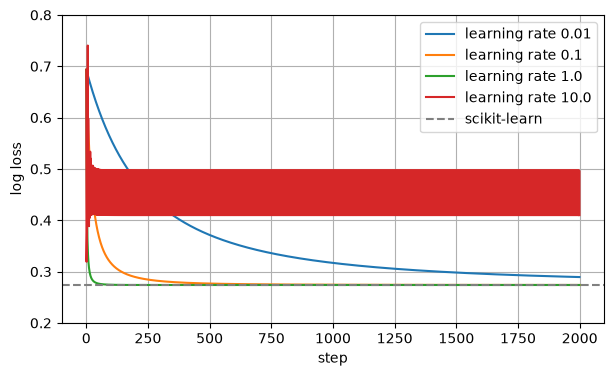
# DEMO ONLY. The same gradient descent loop, inside a function, so we can try several learning rates.def train_neuron(learning_rate): w = torch.zeros(11, requires_grad=True) b = torch.zeros(1, requires_grad=True) losses = []for step inrange(2000): p = torch.sigmoid(X_train_t @ w + b) loss = F.binary_cross_entropy(p, y_train_t) losses.append(loss.item()) loss.backward()with torch.no_grad(): w -= learning_rate * w.grad b -= learning_rate * b.grad w.grad.zero_() b.grad.zero_()return losseslearning_rates = [0.01, 0.1, 1.0, 10.0]plt.figure(figsize=(7, 4))for lr in learning_rates: lr_losses = train_neuron(lr)print("learning rate", lr, " loss after 2000 steps:", round(lr_losses[-1], 4)) plt.plot(lr_losses, label="learning rate "+str(lr))plt.axhline(loss_like_sklearn.item(), color="gray", linestyle="--", label="scikit-learn")plt.xlabel("step")plt.ylabel("log loss")plt.ylim(0.2, 0.8)plt.legend()plt.grid()plt.show()
learning rate 0.01    loss after 2000 steps: 0.2894
learning rate 0.1    loss after 2000 steps: 0.274
learning rate 1.0    loss after 2000 steps: 0.2739
learning rate 10.0    loss after 2000 steps: 0.41
So how do we know what is best?
0.01 is too small. The steps are tiny, and after 2000 of them it still has not reached the bottom.
0.1 and 1.0 both get there. 1.0 gets there faster.
10 is too big. The steps are so big that it jumps right over the bottom. The loss bounces back and forth between about 0.41 and 0.50 at every step (that is the solid red band) and never gets as low as the others.
There is no learning rate that is right for every problem. It is a hyperparameter, just like C or max_depth, and choosing it is a big part of training neural networks. We will see more tools for this later.
NoteQ5. Write this one out by hand
a. Write the five steps of the gradient descent loop in your own words, one sentence each.
b. Look at the learning rate plot. Describe what goes wrong when the learning rate is too small, and what goes wrong when it is too big.
NOTE - The reading talks about running PyTorch on a GPU. A GPU can do lots of multiplications at the same time, which makes training large neural networks much faster. You do not need one for this class. Everything we do runs on your laptop’s CPU, and today’s code only takes a moment. As we train bigger models you might have to be patient.
Putting It Together
Everything from today, in one list:
A neuron does a weighted sum of its inputs plus a bias, then an activation function.
A neuron with a sigmoid activation is logistic regression.
Tensors hold the numbers. @ does the weighted sums for every row at once. Use float32.
Autograd finds the derivatives: requires_grad=True, then .backward(), then read .grad.
The loss is one number that says how wrong the model is. For yes/no problems we use the log loss.
Gradient descent repeats predict, loss, backward, update, clear. The learning rate sets the size of each step.
On Thursday we connect a lot of these neurons together into a network, and use PyTorch’s tools to write the training loop in a more organized way.
New Commands Today
Command
What it does
The thing that trips people up
torch.tensor(data, dtype=torch.float32)
makes a tensor from a list or a numpy array
numpy uses float64. Ask for float32 or PyTorch will complain when you mix them
torch.zeros(11)
a tensor of 11 zeros
add requires_grad=True if you want to learn these numbers
A @ B
matrix multiplication
the shapes have to line up: (1199, 11) @ (11,) gives (1199,)
torch.sigmoid(z)
the sigmoid, for every number in z
F.binary_cross_entropy(p, y)
the log loss
p must be probabilities between 0 and 1, and y must be float, not int
requires_grad=True
tells autograd to track a tensor
only on the numbers you want derivatives for
loss.backward()
computes all the derivatives
they get added to .grad, so clear them with .grad.zero_() every step
with torch.no_grad():
do some math without tracking it
use it for the update step and for predicting
.item()
one number tensor to a plain Python number
only works on a tensor with one number in it
.detach().numpy()
tensor to numpy array
a tensor that is being tracked needs .detach() first
TipYou Try: optional code
Nothing here is collected. Work through it if you want the idea to stick.
1. Check your answer to Q3a with autograd.
2. Start the weights at random numbers instead of zeros: w = torch.randn(11, requires_grad=True). Does gradient descent still end up at the same loss? At the same weights?
3. Train a neuron on only two features, alcohol and volatile acidity. (Hint: X_train_t[:, [10, 1]] picks out those two columns. Why 10 and 1?) How much worse is the validation accuracy than with all eleven?
4. Use LogisticRegression() with the default C=1.0 instead of C=np.inf and compare the weights to our neuron again. Which weights moved, and why?
Before Next Class
In your lecture notes notebook, add your handwritten notes and answers to the questions.
Do the Day 9 practice problems in HW_day9.ipynb. They are practice, not graded, and Weekly Homework 5 assumes you have done them.
Weekly Homework 5 is due Sunday 10/18 at 11:59pm. It covers Day 9 and Day 10.
Read Geron chapter 10, the sections Implementing a Regression MLP and Implementing Mini-Batch Gradient Descent using DataLoaders.
Answers to the Q Boxes
Try every one of these by hand first. These are short summaries, not full answers, and the writing out is the part that does the work.
NoteQ1. Logistic regression is a neuron
a. Two input circles (alcohol and volatile acidity), an arrow from each to a sum node labeled with its weight, a bias going into the sum, then a sigmoid node, then the output p.
b. Only alcohol and volatile acidity are not zero, so z = w_{alcohol} \cdot 1 + w_{volatile} \cdot 0.5 + b. With the alcohol weight 0.977, the volatile acidity weight -0.461 and the bias -2.837, z = 0.977 - 0.2305 - 2.837 \approx -2.09 and p = 1/(1 + e^{2.09}) \approx 0.110.
NoteQ2. Tensors
a. Shape 1199. Each number is the weighted sum z for one training wine.
b. Row 1: 1 \cdot 2 + 0 \cdot 5 + 2 \cdot 1 = 4. Row 2: 3 \cdot 2 + 1 \cdot 5 + 1 \cdot 1 = 12. So B @ a is [4, 12].
NoteQ3. Autograd
a.f'(x) = 3x^2 - 2, so f'(2) = 10. In PyTorch: x = torch.tensor(2.0, requires_grad=True), then f = x**3 - 2*x, then f.backward(), and x.grad should say 10.
b. Autograd adds each new derivative to what is already in .grad, so it held 6 + 6. Add x.grad.zero_() between the two calculations.
NoteQ4. The loss
a. Every term is -\log(0.5) = \log(2), whether the wine is good or not, and the average of the same number is that number. \log(2) \approx 0.693.
b. Accuracy only changes when a wine crosses the 0.5 line. A tiny change to a weight usually moves no wine across the line, so the accuracy does not change at all, and its slope is zero almost everywhere. Gradient descent needs a slope to follow. The log loss changes smoothly with every weight.
NoteQ5. Gradient descent
a. Predict: compute the probabilities with the weights we have now. Loss: measure how wrong they are. Backward: find the derivative of the loss for each weight. Update: move every weight a small step downhill. Clear: reset the stored derivatives to zero.
b. Too small: each step barely moves, so it needs many more steps to reach the bottom (0.01 had not got there after 2000). Too big: each step jumps past the bottom, so the loss bounces around and stays high (10 stuck near 0.4 to 0.5).